
Mailchimp Pricing Explained (2026): Free, Essentials, Standard, and Premium
Mailchimp pricing in 2026: Free under 250 contacts, Essentials/Standard/Premium by contact tier, send multipliers, trials, overages, vs Kit and beehiiv.
Mailchimp’s marketing plans are Free, Essentials, Standard, and Premium. Free is for lists under 250 contacts. Paid plans are priced by how many contacts you have, with monthly email send limits that scale as a multiplier of your contact count. Essentials starts at $13/month, Standard at $20/month, and Premium at $350/month (with a common promo of $297.50/month for 12 months at smaller contact tiers).
This guide is a tier-by-tier breakdown of Mailchimp’s marketing pricing as it appeared on October 9, 2026 (article dated October 8 for our publishing calendar). Prices are in USD from Mailchimp’s marketing pricing page. Mailchimp changes prices and promos often, so confirm on that page before you buy.
How we researched this: This guide is based on Mailchimp’s official marketing pricing page (contact selector, plan cards, feature comparison table, FAQ, nonprofit note, and Pay As You Go note) and Mailchimp’s help article on pricing plans. We haven’t tested Mailchimp’s plans hands-on. The screenshot is a capture of Mailchimp’s public pricing page, not of an account.
About our links: We don’t have a Mailchimp affiliate program, so Mailchimp links go straight to mailchimp.com. beehiiv links on this page are affiliate links (/go/beehiiv). Kit and HubSpot links go through /go/kit and /go/hubspot, which currently forward to those vendors’ homepages; we don’t earn a commission from Kit or HubSpot. Our recommendations would be the same either way.
Mailchimp pricing at a glance
| Plan | Starting price (0–500 contacts) | Contact basis | Monthly email sends | Seats / audiences | Trial |
|---|---|---|---|---|---|
| Free | $0 | Under 250 contacts | Max 500/mo or 250/day (feature table) | 1 seat, 1 audience | N/A (forever free under the limit) |
| Essentials | $13/mo† | Priced by contact tier | 10× contacts | 3 seats, 3 audiences | 14-day free trial |
| Standard | $20/mo† | Priced by contact tier | 12× contacts | 5 seats, 5 audiences | 14-day free trial |
| Premium | $350/mo† (often shown as $297.50/mo for 12 months, then $350) | Priced by contact tier | 15× contacts | Unlimited seats & audiences | Contact sales for Premium trial options |
† Paid plan cards say overages apply if you exceed your contact or email send limit. Source: Mailchimp marketing pricing, checked October 9, 2026. Free send/seat/audience limits come from the same page’s feature comparison table and Mailchimp’s About pricing plans help article.
See Mailchimp’s pricing · Compare beehiiv · Compare Kit
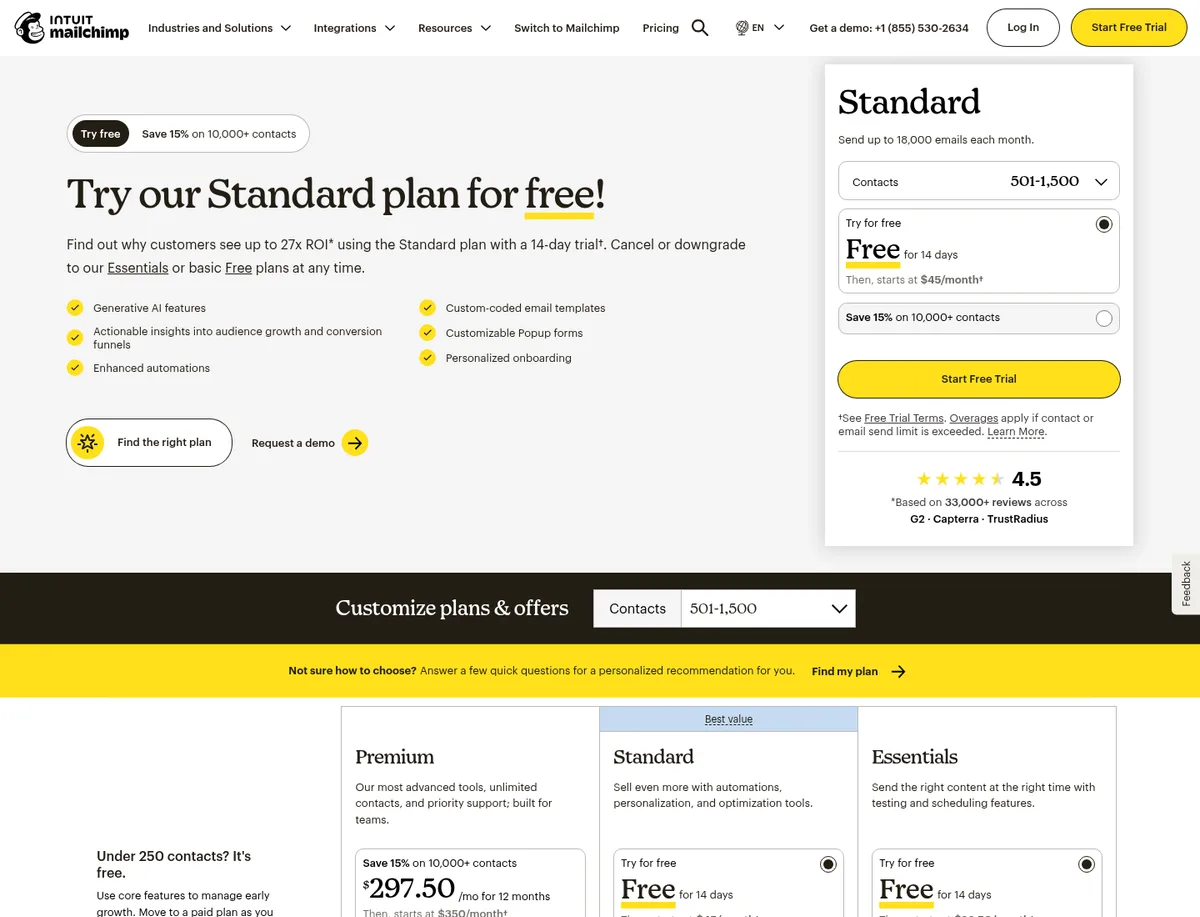
Free: under 250 contacts
Mailchimp’s pricing page highlights “Under 250 contacts? It’s free.” The Free plan is positioned for early growth with core features, then a move to a paid plan as you scale.
From the feature comparison table and Mailchimp’s About pricing plans help article (re-checked October 9, 2026):
- Up to 250 contacts
- Monthly email sends: max of 500/month or 250/day
- 1 seat, 1 audience
- On the Free card, Mailchimp notes that sending will be paused if you exceed the contact or email send limit
- Email support is limited (feature table: email support for the first 30 days on Free)
- Free does not include email scheduling or removing Mailchimp branding (per the comparison table)
When Free is enough: you’re testing Mailchimp with a tiny list and light sending. Once you cross 250 contacts or need more than 500 sends/month, you’re looking at Essentials or higher.
Source: Mailchimp marketing pricing and About pricing plans, checked October 9, 2026.
Essentials: testing, scheduling, and a lower send multiplier
Essentials is Mailchimp’s entry paid plan. On October 9, 2026, the plan card described it as sending the right content at the right time with testing and scheduling features, with a 14-day free trial, then pricing that starts at $13/month for 0–500 contacts.
What the comparison table lists for Essentials (vs Free):
- Monthly email sends: 10× contacts
- 3 seats, 3 audiences, 2 role-based access roles
- Marketing automation: up to 4 flow steps
- Remove Mailchimp branding, email scheduling, popup forms, pre-built templates
- 24/7 email & chat support
- SMS listed as an add-on (not MMS)
- Generative AI features: not included on Essentials
When Essentials makes sense: you need branding removal, scheduling, and light automation, and you’re okay with the 10× send ceiling.
Source: Mailchimp marketing pricing plan cards and feature table, checked October 9, 2026.
Standard: automations and a higher send multiplier
Standard is the plan Mailchimp pushes hardest on the pricing page (often labeled “Best value”). It starts at $20/month for 0–500 contacts, also with a 14-day free trial.
Compared with Essentials, Standard’s feature table adds:
- Monthly email sends: 12× contacts
- 5 seats, 5 audiences, 4 roles
- Marketing automation: up to 200 flows
- Generative AI features as a no-additional-cost add-on
- Custom-coded templates: create and send
- Branded templates, custom reports, dynamic content
- 1 personalized onboarding session
- SMS and MMS add-on (vs SMS-only add-on on Essentials)
At 0–500 contacts, 12× means up to 6,000 emails/month—the number Mailchimp also prints on the Standard hero (“Send up to 6,000 emails each month”).
When Standard makes sense: you want multi-step automations, higher send volume, or the onboarding/AI extras Essentials leaves out.
Source: Mailchimp marketing pricing, checked October 9, 2026.
Premium: teams, phone support, and 15× sends
Premium is Mailchimp’s top self-serve marketing tier. On October 9, 2026, at smaller contact ranges it showed a promo of $297.50 per month for 12 months, then $350/month. At 10,001–15,000 contacts, the post-promo list price on the cards was $465/month (with a different first-year promo figure on that tier).
Premium’s feature table highlights:
- Monthly email sends: 15× contacts
- Unlimited users and audiences, 5 roles, enterprise SSO
- Up to 200 marketing automation flows
- Phone & priority support, 4 personalized onboarding sessions, dedicated onboarding specialist
- Premium migration services via Contact Sales
Mailchimp’s FAQ also points high-volume senders (more than 200,000 contacts) to a high-volume plan via sales.
When Premium makes sense: larger teams that need phone support, SSO, and the highest send multiplier—not a solo newsletter writer comparing first paid plans.
Source: Mailchimp marketing pricing, checked October 9, 2026.
What it costs at common contact tiers
Mailchimp’s pricing page has a Number of Contacts selector. Here are the Essentials and Standard “Then, starts at” prices we recorded on October 9, 2026 (USD). Premium’s promo/list prices also change with the selector; the table focuses on the two plans most people compare first.
| Contacts | Essentials | Standard |
|---|---|---|
| 0–500 | $13/mo | $20/mo |
| 501–1,500 | $26.50/mo | $45/mo |
| 1,501–2,500 | $45/mo | $60/mo |
| 2,501–5,000 | $75/mo | $100/mo |
| 5,001–10,000 | $110/mo | $135/mo |
| 10,001–15,000 | $180/mo | $230/mo |
Rough list-size mapping: if you have about 1,000 contacts, use the 501–1,500 row. If you have about 5,000, use 2,501–5,000.
The page also advertises save 15% on 10,000+ contacts (with Essentials called out for a 15% for 12 months save in the “Basic plans” blurb). Treat that as a page promo and confirm the math on your selected tier before you buy.
Source: headless Chrome capture of Mailchimp marketing pricing contact selector, October 9, 2026.
Send multipliers, overages, trial, Pay As You Go, and nonprofit discount
Email send multipliers
| Plan | Monthly sends |
|---|---|
| Free | Max 500/mo or 250/day |
| Essentials | 10× contacts |
| Standard | 12× contacts |
| Premium | 15× contacts |
Example: at 1,500 contacts on Standard, 12× is 18,000 sends/month. The same list on Essentials is 15,000 sends/month.
Overages and Free pauses
- Paid plans: plan-card footnotes say overages apply if you exceed your contact or email send limit. Mailchimp’s FAQ says that after the free trial, if you hit those limits, Mailchimp will automatically bill you for overages; if you pay on time, it will not stop campaigns or pause the account.
- Free: the Free card says sending will be paused if limits are exceeded. Mailchimp’s About pricing plans help article adds that exceeding 250 contacts on Free places a hold on sending live or test emails until you upgrade or reduce contacts.
14-day free trial
The FAQ: the free trial of Standard or Essentials lasts 14 days. You provide payment info at enrollment; Mailchimp sends billing reminders before the trial ends; cancel during the trial and you won’t be charged for those services. Premium has a separate sales-led trial note in the disclaimers (qualified new customers, contact sales).
Pay As You Go
Mailchimp also offers a Pay As You Go option: buy email credits as needed instead of a monthly or annual plan. The page says it’s best for infrequent senders.
Nonprofit discount
Still on the page on October 9, 2026: Mailchimp offers a 15% discount to nonprofits and charities. Request it by signing up for a free account and contacting Billing with your username and a link to your organization’s website.
Source: Mailchimp marketing pricing FAQ and page sections; About pricing plans, checked October 9, 2026.
How Mailchimp compares to Kit and beehiiv at 1k and 5k
Mailchimp is a general email-marketing platform. Kit and beehiiv are newsletter / creator tools. Quick price check from each vendor’s official pricing page on October 9, 2026 (Mailchimp contact tiers; Kit and beehiiv subscriber sliders):
| List size | Mailchimp Essentials | Mailchimp Standard | Kit Creator | beehiiv Lite |
|---|---|---|---|---|
| ~1,000 | $26.50/mo (501–1,500 tier) | $45/mo | $39/mo monthly / $33/mo billed yearly | $59/mo monthly / $49/mo billed yearly |
| ~5,000 | $75/mo (2,501–5,000 tier) | $100/mo | $89/mo monthly / $75/mo billed yearly | $109/mo monthly / $95/mo billed yearly |
Other differences that matter more than the headline dollar amount:
- Free ceilings. Mailchimp Free: 250 contacts. Kit Free: up to 10,000 subscribers. beehiiv Free: up to 2,500 subscribers.
- Send limits. Mailchimp uses 10× / 12× / 15× multipliers (and Free’s hard cap). Kit’s FAQ and beehiiv’s FAQ both say unlimited email sends on their plans (confirm on each pricing page).
- Paid newsletters. beehiiv documents paid subscriptions with a 0% platform take on Lite+ (Stripe’s 2.9% + $0.30 still applies). Kit sells subscriptions on Free and paid plans with a 3.5% + 30¢ commerce fee that Kit says includes card processing. Mailchimp’s marketing pricing page is not positioned as a paid-publication host the way Kit and beehiiv are.
- HubSpot is a different category again (CRM + Marketing Hub). See HubSpot Marketing Hub pricing explained.
Full guides: Kit pricing explained, beehiiv pricing explained, beehiiv vs Mailchimp, Kit vs Mailchimp.
Our recommendation
Based on Mailchimp’s documented marketing pricing:
- Use Free only while you’re under 250 contacts and 500 sends/month. Crossing either limit forces a pause or an upgrade.
- Try Essentials if you need branding removal, scheduling, and light automation and want the lowest paid entry price—but watch the 10× send limit if you email often.
- Prefer Standard when automations and the 12× multiplier matter; it’s the plan Mailchimp markets as best value and the one with the 14-day trial most people will land on.
- Skip Premium for a solo newsletter unless you need phone support, SSO, or team-scale seats—the starting $350/mo (or promo $297.50) is a different budget than Kit Creator or beehiiv Lite.
- Compare Kit or beehiiv first if your product is a newsletter: higher free subscriber caps, unlimited sends on those platforms’ FAQs, and clearer paid-subscription economics.
See Mailchimp pricing · Try beehiiv · Try Kit · See HubSpot
FAQ
How much does Mailchimp cost per month?
As of October 9, 2026: Free is $0 under 250 contacts. Essentials starts at $13/mo, Standard at $20/mo, and Premium at $350/mo (often $297.50/mo for 12 months at smaller tiers). Prices rise with your contact tier—for example, Standard is $45/mo at 501–1,500 contacts and $100/mo at 2,501–5,000.
Source: Mailchimp marketing pricing, checked October 9, 2026.
Is there a free trial?
Yes. The FAQ says the free trial of Standard or Essentials lasts 14 days. Premium trials are described separately via sales in the page disclaimers.
What happens if I go over my contact or send limit?
On paid plans, Mailchimp says it bills overages automatically after the trial. On Free, sending is paused if you exceed limits until you upgrade or reduce contacts.
Does Mailchimp discount nonprofits?
Yes. The pricing page still offers a 15% nonprofit/charity discount; request it through Billing after signing up for a free account.
Can I pay only when I send?
Yes. Mailchimp’s Pay As You Go plan lets you buy email credits instead of a recurring plan. The page says it’s best for infrequent senders.
Is Mailchimp cheaper than Kit or beehiiv?
It depends on list size and which Mailchimp plan you need. At ~1,000 contacts, Mailchimp Essentials ($26.50) can undercut Kit Creator monthly ($39) and beehiiv Lite monthly ($59), but Mailchimp Free is far smaller (250 vs Kit’s 10,000 / beehiiv’s 2,500), and Mailchimp’s send multipliers can push frequent senders into higher tiers or overages. Compare features, not just the starting price.
Sources
All checked October 9, 2026, unless noted.
- Mailchimp: Marketing pricing — contact selector tiers, plan cards (Free / Essentials / Standard / Premium), feature comparison (send multipliers, seats, audiences, automation), FAQ (14-day trial, overages), nonprofit 15% note, Pay As You Go note
- Mailchimp: About pricing plans — Free plan contact and send limits
- Kit pricing cited for comparison: kit.com/pricing (Creator at 1,000 and 5,000 subscribers, monthly and yearly billing, re-checked October 9, 2026 via Kit’s subscriber slider)
- beehiiv pricing cited for comparison: beehiiv.com/pricing (Free / Lite / Pro cards and FAQ, including 0% platform take and Stripe 2.9% + $0.30, re-checked October 9, 2026)
- Related AudienceBench guides: MailerLite pricing explained, Kit pricing explained, beehiiv pricing explained, beehiiv vs Mailchimp, migrate Mailchimp to beehiiv