
Kit vs Mailchimp (2026): Which Is Better for Newsletters?
Kit vs Mailchimp for newsletters in 2026: free plan limits, paid pricing as your list grows, automations, forms, and digital products—cited to official pages.
Kit (formerly ConvertKit) and Mailchimp both send email, but they are aimed at different jobs. Kit is built for creators and newsletter writers who want landing pages, tags, automations, and a way to sell digital products or a paid newsletter. Mailchimp is a broader small-business marketing platform—email plus audiences, CRM-style tools, ecommerce integrations, and (on paid plans) SMS—priced by contact count with monthly send caps.
If your main goal is a growing newsletter, the free-plan gap alone often decides it: Kit Free covers up to 10,000 subscribers with no sending limits, while Mailchimp Free stops at 250 contacts and 500 sends per month.
This comparison is based on each vendor’s official pricing page and help docs, checked on September 30, 2026. Prices are in USD and change often, so confirm on Kit’s pricing page and Mailchimp’s marketing pricing page before you commit.
How we researched this: We haven’t tested Kit or Mailchimp hands-on for this article. Everything below comes from each vendor’s official documentation and pricing pages. The screenshots are captures of the vendors’ public pricing pages, not of our own accounts.
About our links: Kit links on this page are affiliate links (/go/kit). Mailchimp is linked directly; we don’t earn a commission from Mailchimp. Where we mention beehiiv as an alternative, that link is also affiliate (/go/beehiiv). Our recommendations would be the same either way.
Quick picks
- Choose Kit for most newsletters. The free plan is far larger, sends aren’t capped, and you can sell a paid newsletter or digital products without upgrading. Creator (from $39/month at 1,000 subscribers on monthly billing) unlocks sequences and visual automations.
- Choose Mailchimp if you need a general small-business marketing stack—multiple audiences, store integrations, SMS add-ons, and CRM-ish contact management—more than a creator-focused newsletter toolkit.
- Already on Mailchimp and mainly write a newsletter? Read How to migrate from Mailchimp to Kit. Kit offers a free migration service on paid plans.
- Want a publication website first? Also compare beehiiv in our Kit vs beehiiv guide, or see beehiiv vs Mailchimp for a head-to-head with Mailchimp.
Try Kit free · See Mailchimp pricing
At a glance
| Kit | Mailchimp | |
|---|---|---|
| Free plan limit | Up to 10,000 subscribers | Up to 250 contacts |
| Free plan sending | No sending limits (per Kit FAQ) | 500 sends/month (max 250/day); sending paused if limits exceeded |
| Cheapest paid plan (lowest tier) | Creator: $39/mo monthly, or $33/mo billed yearly (1,000 subscribers) | Essentials: from $13/mo (after 14-day free trial; includes up to 500 contacts at the starting price) |
| Next paid tier | Pro: from $79/mo monthly (1,000 subscribers) | Standard: from $20/mo; Premium from $350/mo (promo $297.50/mo for 12 months when shown) |
| Paid plan sending | No sending limits | Essentials 10× contacts; Standard 12×; Premium 15× (overages apply) |
| Automations | Creator+: unlimited sequences + visual automations | Free: none listed; Essentials: up to 4 flow steps; Standard/Premium: up to 200 flows |
| Landing pages / forms | Unlimited on all plans (including Free) | Popup forms listed on paid and Free feature table; broader landing-page marketing is part of Mailchimp’s product set |
| Paid newsletter / commerce | Sell digital products & subscriptions on all plans, including Free; fee 3.5% + 30¢ (includes card processing) | Not presented as a paid-newsletter product on the marketing pricing page |
| Team seats | Free 1 · Creator 2 · Pro unlimited | Free 1 · Essentials 3 · Standard 5 · Premium unlimited |
| Best for | Creators and newsletter writers | Small-business email marketing and multi-channel campaigns |
| Affiliate note | We earn on Kit referrals | No Mailchimp affiliate on this site — linked directly |
Sources: Kit pricing, Mailchimp marketing pricing, About Mailchimp pricing plans.
Free plans: Kit Free vs Mailchimp Free
This is the biggest practical difference for newsletter writers.
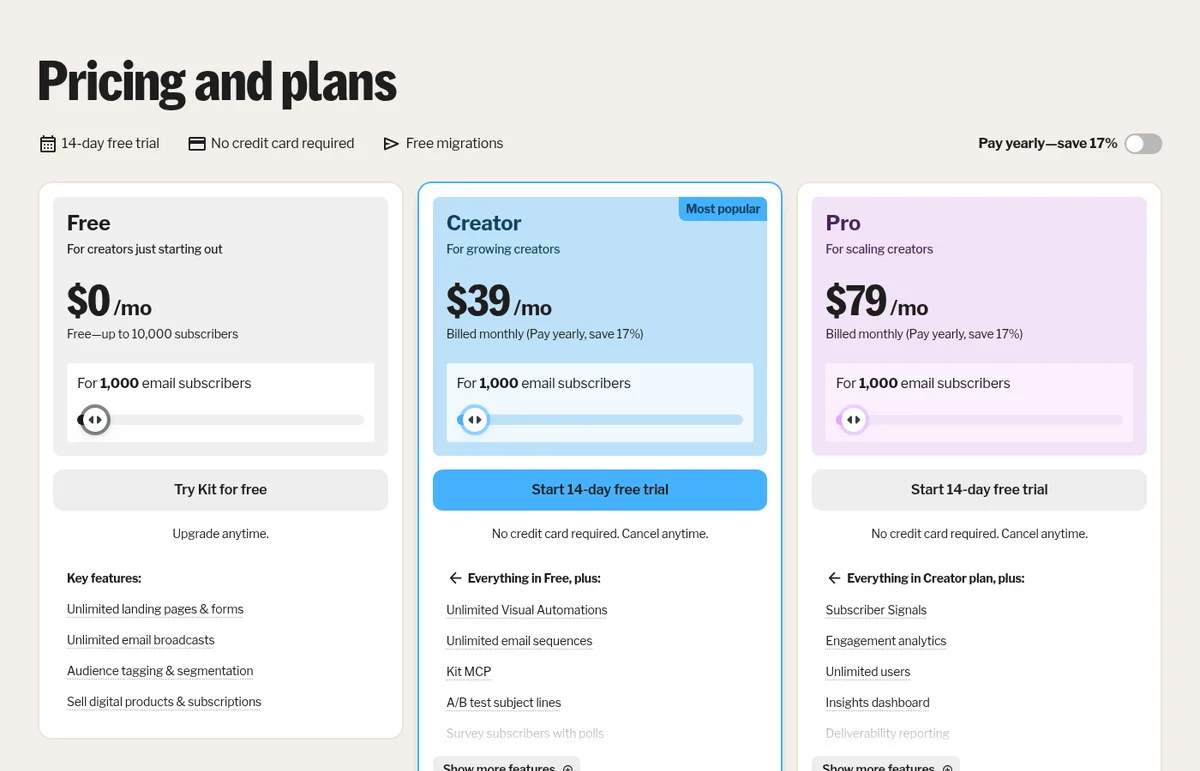
Kit Free costs $0/month for up to 10,000 subscribers and 1 user. Kit’s plan card lists unlimited landing pages and forms, unlimited email broadcasts, audience tagging and segmentation, and the ability to sell digital products and subscriptions. Kit’s FAQ states there are no sending limits on any plan. What’s missing on Free: email sequences, visual automations, RSS campaigns, removal of Kit branding, and more than one user. You can grow and send a weekly newsletter by hand for a long time; you cannot run an automated welcome series until Creator.
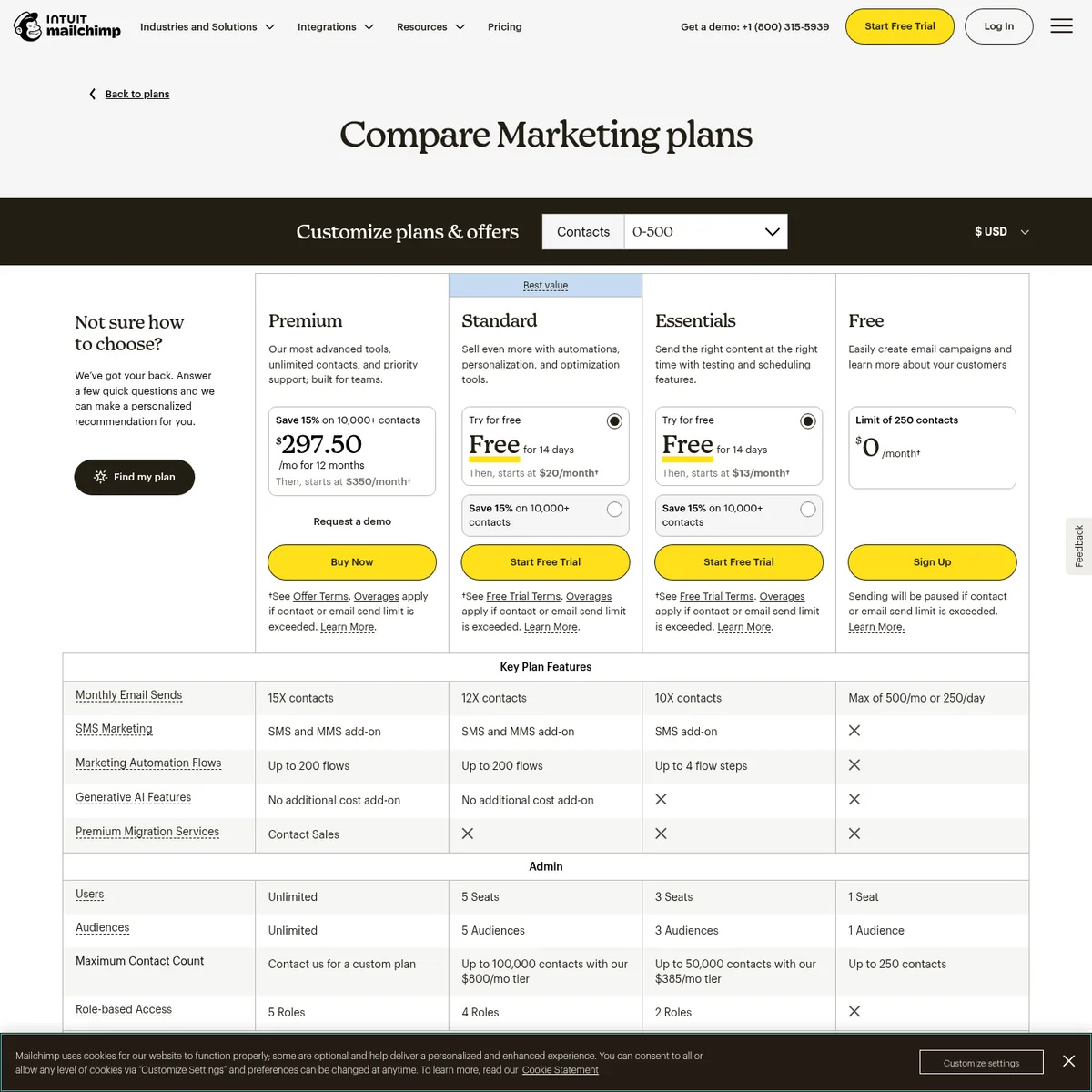
Mailchimp Free is aimed at early testing. Mailchimp’s pricing page and help article say the Free plan includes up to 250 contacts and 500 sends per month, with a daily send limit of 250, 1 seat, and 1 audience. The pricing page notes that sending will be paused if the contact or email send limit is exceeded. The Key Plan Features table shows Free with no marketing automation flows. Support on Free is limited (Mailchimp’s help article mentions email support for the first 30 days on Free).
Bottom line: for a newsletter you intend to grow past a few hundred people, Kit’s free plan lasts much longer. Mailchimp Free is a short runway—useful to try the product, not to build a list.
Paid pricing as your list grows
Both vendors price by audience size, but the models feel different.
Kit Creator and Pro (monthly billing)
Kit’s pricing page uses a subscriber slider. On September 30, 2026, monthly billing showed:
| Subscribers | Kit Creator | Kit Pro |
|---|---|---|
| 1,000 | $39/mo | $79/mo |
| 3,000 | $59/mo | $99/mo |
| 5,000 | $89/mo | $139/mo |
| 8,000 | $119/mo | $169/mo |
| 10,000 | $139/mo | $189/mo |
| 15,000 | $169/mo | $249/mo |
| 20,000 | $189/mo | $269/mo |
| 25,000 | $199/mo | $279/mo |
Kit advertises “Pay yearly—save 17%.” At 1,000 subscribers, Creator is $33/mo and Pro $66/mo when billed yearly ($390 and $790 billed yearly). Paid plans include a 14-day free trial with no credit card, and Kit’s FAQ mentions a 30-day refund window. When you pass a tier, Kit says it automatically upgrades you; downgrades after a list cleanup currently require contacting support.
Full tier tables and feature breakdowns: Kit pricing explained.
Mailchimp Essentials, Standard, and Premium
Mailchimp’s marketing pricing page (checked September 30, 2026) shows starting prices at the lowest contact tier:
- Essentials: from $13/month after a 14-day free trial
- Standard: from $20/month after a 14-day free trial (“Best value” on the page)
- Premium: promo $297.50/month for 12 months, then starts at $350/month
Mailchimp’s help article says Essentials starts with up to 500 contacts, prices rise with contact total, and Essentials can store up to 50,000 contacts, with monthly sends at 10× the contact limit. The pricing comparison table lists Standard sends at 12× contacts and Premium at 15×, and notes overages apply if contact or send limits are exceeded on paid plans. The page also promotes 15% off for 10,000+ contacts (first 12 months, with terms).
Mailchimp does not publish a single flat price at every list size on the same simple slider Kit uses; you select a contact range on the page. For newsletter math, the important contrast is: Kit Free still covers you at 5,000 or even 9,000 subscribers, while Mailchimp already requires a paid plan past 250 contacts—and paid Mailchimp plans still enforce send multipliers.
Sources: Kit pricing and Mailchimp marketing pricing, checked September 30, 2026; About Mailchimp pricing plans.
Automations
If you want a welcome series, a lead-magnet delivery sequence, or behavior-based paths, compare when automations unlock.
- Kit: tagging and segmentation exist on Free, but automated email sequences and the visual automation builder start on Creator. Creator includes unlimited visual automations, unlimited sequences, a template library, apps/integrations, RSS campaigns, and subject-line A/B tests (Pro expands A/B testing and adds deliverability reporting, collaborative editing, and more).
- Mailchimp: the Free plan’s feature table shows no marketing automation flows. Essentials includes marketing automation flows with up to 4 flow steps. Standard and Premium list up to 200 flows, plus stronger personalization and AI features on those higher plans (per the pricing table).
For a newsletter writer who mainly needs a welcome sequence and a few nurture emails, Kit Creator is the natural upgrade path. For a store or multi-step customer journey library, Mailchimp’s Standard/Premium flow limits are aimed at that broader marketing use case.
Landing pages and forms
Kit lists unlimited landing pages and forms on Free, Creator, and Pro, with templates, custom domains (or a Kit domain), opt-in incentive delivery, and list-growth reporting. Forms can be modal, sticky bar, slide-in, or inline embeds, according to the plan comparison table.
Mailchimp includes popup forms across the plans shown in its Key Plan Features table (including Free). Mailchimp is also positioned as a broader marketing platform with templates, landing pages, and website-related tools elsewhere in its product marketing. For a creator whose homepage is a signup page plus a newsletter archive, Kit’s unlimited pages-and-forms model on Free is the simpler documented fit.
Ecommerce and digital products
Kit treats commerce as a first-class creator feature. Every plan, including Free, lists selling digital products, paid newsletters, recurring subscriptions, and tip jars. The transaction fee on the pricing page is 3.5% + 30¢ on all plans, and Kit states that figure includes credit card processing (describing Kit’s own portion as 0.6%). Creator adds Paid Recommendations (23.5% fee on those earnings) and newsletter sponsorships; Creator also lists abandon-checkout recovery for Shopify, Fourthwall, and Wix.
Mailchimp is strong for store-connected marketing (Shopify and other integrations appear throughout Mailchimp’s site), automations around purchases, and SMS as a paid add-on on marketing plans. Its marketing pricing page does not present a built-in paid-newsletter subscription product the way Kit and beehiiv do. If your monetization model is “charge readers for the newsletter,” Kit documents that path clearly; if your monetization is “email a customer list from a store,” Mailchimp’s ecosystem may fit better.
Deliverability
Neither vendor’s public pricing page is a place to make absolute inbox-rate claims. Kit Pro lists deliverability reporting as a plan feature (seeing which providers or segments underperform). Mailchimp markets itself as a large email platform and documents sending limits and overages, but we are not repeating marketing ROI or deliverability statistics here beyond what the plan tables state as product features. For any platform, follow Google and mailbox-provider sender requirements (SPF, DKIM, and where required DMARC and one-click unsubscribe).
When Kit wins
Based on the documented plans and prices checked September 30, 2026:
- You want a newsletter-first tool with a free plan that can grow past a few hundred subscribers
- You need unlimited sends without multiplying “contacts × sends”
- You want to sell a paid newsletter or digital downloads without upgrading first
- You care about tags, sequences, and visual automations once you’re ready to pay for Creator
- You’re leaving Mailchimp and want Kit’s free paid-plan migration help (migration guide)
When Mailchimp wins
Be honest: Mailchimp is still a reasonable pick in some situations.
- You run a local business, store, or agency-style marketing and want one familiar platform for audiences, campaigns, and integrations—not a creator stack
- You need multiple audiences (Essentials 3, Standard 5, Premium unlimited) rather than Kit’s single-list-plus-tags model
- You want SMS/MMS marketing as an add-on on paid plans (availability and credits vary by market)
- Your list is tiny (under 250 contacts) and you are only testing email, where Mailchimp Free is enough for a short while
- Your team already knows Mailchimp and switching costs (rebuilding journeys, forms, integrations) outweigh Kit’s free-plan savings
If you’re choosing among beginner newsletter tools more broadly, see Best newsletter platform for beginners in 2026.
Which should you pick?
| Your situation | Better fit (based on documented features and pricing) |
|---|---|
| Starting a newsletter from zero, want free growth room | Kit Free (up to 10,000 subscribers) |
| Need an automated welcome series | Kit Creator (or Mailchimp Essentials+ if you stay in Mailchimp) |
| Selling courses, tips, or a paid newsletter | Kit (commerce on all plans) |
| Store + email + SMS marketing for a small business | Mailchimp Standard or higher |
| Already on Mailchimp, mostly send a newsletter | Consider switching to Kit; see the migration guide |
| Want a full publication website / ad network | Compare beehiiv as well |
What we’ll add after hands-on testing
Once we’ve set up accounts on both platforms, we can update this comparison with:
- Screenshots of both editors, automation builders, and analytics from those accounts
- How long a basic welcome email takes to set up on each
- Notes on import quirks when moving a real Mailchimp audience into Kit
Until then, treat this as a pricing-and-feature map from official sources—not a performance review.
Sources
All checked September 30, 2026.
- Kit: Pricing and plans (plan cards, comparison table, FAQ, monthly slider tiers)
- Mailchimp: Marketing plans and pricing
- Mailchimp: About Mailchimp pricing plans (Free: 250 contacts, 500 sends/month, 250/day)
- Related AudienceBench guides: Kit pricing explained, beehiiv vs Mailchimp, Migrate Mailchimp to Kit, Best newsletter platform for beginners, Kit vs beehiiv