
beehiiv vs Mailchimp (2026): Which Is Better for Newsletters?
beehiiv vs Mailchimp in 2026: free plans, prices at 1k–10k subscribers, send limits, automations, monetization, and migration—cited to official pages.
beehiiv and Mailchimp both send email newsletters, but they are built around different businesses. beehiiv is a newsletter publication platform: a hosted website, a recommendation network, paid subscriptions, and an ad network, priced by subscriber count with unlimited sends. Mailchimp is a general small-business marketing platform: audiences, automation flows tied to stores, SMS add-ons, and transactional email, priced by contact count with monthly send limits.
For a newsletter writer, the free plans decide a lot before features even come up: beehiiv Free covers up to 2,500 subscribers with unlimited sends, while Mailchimp Free covers up to 250 contacts and 500 sends per month (max 250 per day). Paid pricing is closer than you might expect at small list sizes. At 1,000 subscribers, beehiiv Lite is $59/month on monthly billing, and Mailchimp’s 501–1,500 contact range shows Essentials at $26.50/month and Standard at $45/month. What you get for that money is very different, though.
This comparison is based on each vendor’s official pricing pages, plan help articles, and migration docs, checked on October 5, 2026. Prices are in USD and change often, so confirm on beehiiv’s pricing page and Mailchimp’s marketing pricing page before you commit.
How we researched this: We haven’t tested beehiiv or Mailchimp hands-on for this article. Everything below comes from each vendor’s official documentation and public pricing pages. The screenshots are captures of those public pricing pages, not of our own accounts.
About our links: beehiiv links on this page are affiliate links (/go/beehiiv). Mailchimp is linked directly; we don’t earn a commission from Mailchimp. Where we mention Kit as an alternative, that link is also affiliate (/go/kit). Our recommendations would be the same either way.
Quick picks
- Choose beehiiv if the newsletter is the product. The free plan lasts longer (up to 2,500 subscribers, unlimited sends), and Lite adds paid subscriptions with a 0% beehiiv take (Stripe fees still apply), the ad network, and automations.
- Choose Mailchimp if email is one channel for a business that sells things: store-connected automation flows, multiple audiences, SMS marketing add-ons, and transactional email for receipts and password resets.
- Already on Mailchimp? beehiiv documents a Mailchimp migration path for both subscribers and past campaigns (summary below; full walkthrough in How to migrate from Mailchimp to beehiiv). If you’d rather move to a creator email tool without a publication website, see How to migrate from Mailchimp to Kit.
- Want creator automations without a publication site? Compare Kit in our Kit vs Mailchimp guide.
Try beehiiv free · See Mailchimp pricing
At a glance
| beehiiv | Mailchimp | |
|---|---|---|
| Positioning | Newsletter publication platform | Small-business marketing platform |
| Free plan | $0 forever, up to 2,500 subscribers | $0, up to 250 contacts |
| Free plan sending | Unlimited email sends (FAQ; every plan) | 500 sends/month, max 250/day |
| Paid plans | Lite, Pro (self-serve); Enterprise (sales) | Essentials, Standard, Premium |
| Cheapest paid at 1,000 subscribers | Lite $59/mo monthly or $49/mo yearly | Essentials $26.50/mo (501–1,500 contacts) |
| Paid sending | Unlimited on all plans | Essentials 10×, Standard 12×, Premium 15× your contact limit per month |
| Automations | Not on Free (welcome email only); Lite 10 live custom automations; Pro unlimited | Not on Free; Essentials flows up to 4 steps; Standard/Premium up to 200 flows |
| Paid newsletter | Paid subscriptions on Lite+, 0% take (Stripe 2.9% + $0.30) | Not presented on Mailchimp’s marketing pricing page |
| Ads / recommendations | Ad network and paid recommendations on Lite+; recommendation network on Free | Not presented on the pricing page |
| Website | Website builder and hosting on all plans; custom domains on Lite+ | Free plan lets you try landing pages and forms; Website plans are a separate add-on fee |
| SMS | Not listed on beehiiv’s pricing page | SMS add-on on paid plans in select markets (MMS on Standard/Premium, US and Canada) |
| Transactional email | Not presented as a separate product (Pro lists a “Send API”) | Transactional add-on for Standard and Premium |
| Team seats | Free 1 · Lite 2 · Pro 10 · Enterprise unlimited | Free 1 · Essentials 3 · Standard 5 · Premium unlimited |
| Free trial on paid plans | Lite and Pro, no credit card needed | 14 days on Essentials/Standard; payment info required |
| Affiliate note | We link via /go/beehiiv | No Mailchimp affiliate on this site; linked directly |
Sources: beehiiv pricing, Mailchimp marketing pricing, About Mailchimp pricing plans, Mailchimp Transactional pricing, all checked October 5, 2026.
Free plans: beehiiv Free vs Mailchimp Free
beehiiv Free is $0 forever for up to 2,500 subscribers. The plan card lists unlimited email sends, email templates, landing pages, the recommendation network, and API/integrations. beehiiv’s FAQ is direct about sending: “Every plan includes unlimited email sends.” The feature table gives Free 1 team seat, 1 publication, a website builder with web hosting, a welcome email, and 1 custom page. Not on Free: paid subscriptions, the ad network, custom automations, A/B testing, custom domains, and removing beehiiv branding (branding removal starts on Pro).
Mailchimp Free is a short runway by comparison. Mailchimp’s help article says Free includes up to 250 contacts and 500 sends per month, with a daily send limit of 250, plus 1 audience, 1 seat, a limited set of templates, basic reporting, and a chance to try landing pages and forms. If you go over 250 contacts, Mailchimp places a hold on sending live or test emails until you upgrade or cut your list. The pricing table shows Free with no automation flows, no email scheduling, Mailchimp branding (removal is a paid-plan feature), and email support for the first 30 days only.
Bottom line: if you’re starting a newsletter and want to grow it before paying, beehiiv Free gives you about ten times the subscriber room and no send cap. Mailchimp Free is enough to try the editor or email a very small customer list, not to build an audience.
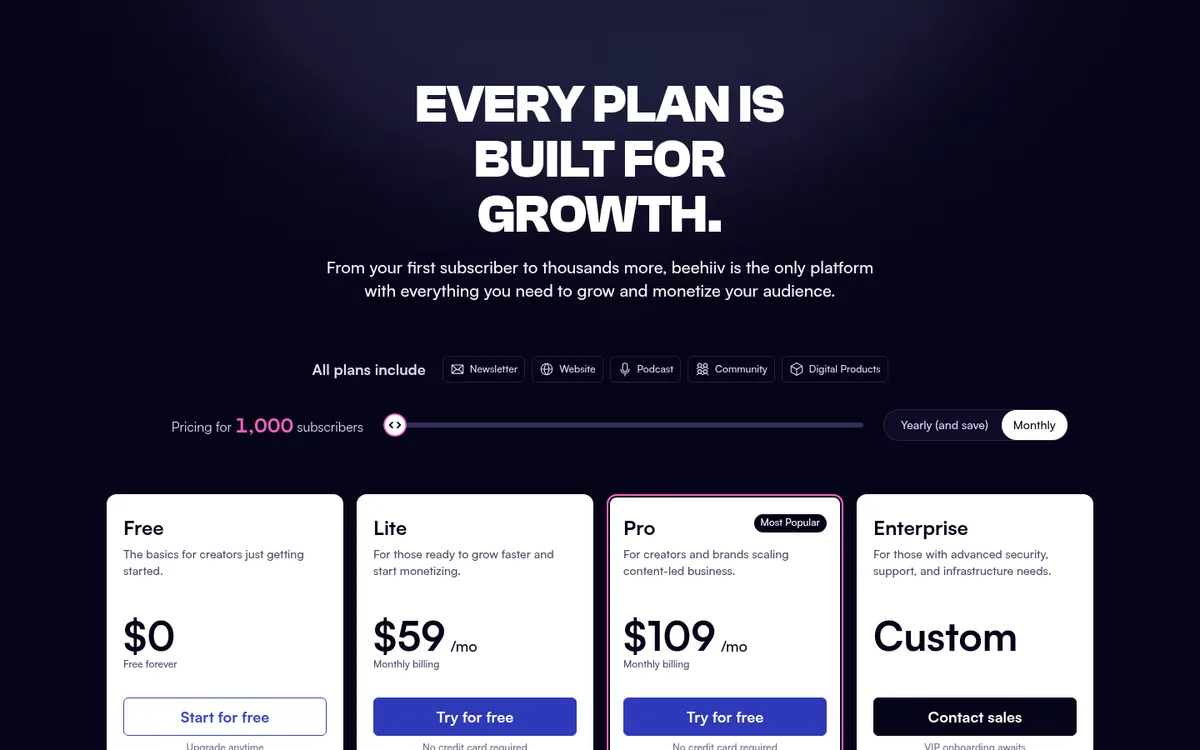
Pricing at common list sizes
Both vendors price by audience size, but they count differently. beehiiv counts unique email addresses subscribed to your publication, and sends are unlimited. Mailchimp puts you in a contact range, and that range sets both your price and your monthly send limit.
Here’s what each pricing page showed on October 5, 2026, using monthly billing for both (Mailchimp’s self-serve plans are monthly; beehiiv’s yearly prices are listed separately below):
| Subscribers | beehiiv Free | beehiiv Lite | beehiiv Pro | Mailchimp Essentials | Mailchimp Standard |
|---|---|---|---|---|---|
| 1,000 | $0 | $59/mo | $109/mo | $26.50/mo (501–1,500) | $45/mo (501–1,500) |
| 2,500 | $0 | $79/mo | $149/mo | $45/mo (1,501–2,500) | $60/mo (1,501–2,500) |
| 5,000 | Not available | $109/mo | $199/mo | $75/mo (2,501–5,000) | $100/mo (2,501–5,000) |
| 10,000 | Not available | $139/mo | $239/mo | $110/mo (5,001–10,000) | $135/mo (5,001–10,000) |
A few notes on reading that table:
- beehiiv yearly billing is cheaper. At the same list sizes, yearly prices shown per month were Lite $49 / $69 / $95 / $119 and Pro $95 / $129 / $169 / $199. beehiiv’s FAQ says yearly saves up to 20%.
- Mailchimp’s 15% offer: at the 5,001–10,000 range, the page also showed Essentials at $93.50/mo and Standard at $114.75/mo for 12 months under its “Save 15% on 10,000+ contacts” offer. Mailchimp says annual plans for Premium and Standard at 10,000+ contacts go through sales.
- Mailchimp Premium showed $350/month (promo $297.50/month for 12 months) across all of these ranges. Mailchimp’s help article says Premium’s base price includes 10,000 contacts.
- Mailchimp also has a Pay As You Go option (email credits instead of a monthly plan), which it describes as best for infrequent senders, and a 15% nonprofit discount.
Mailchimp is cheaper in raw dollars at most of these sizes. The catch is what’s in the box: those Mailchimp prices still come with send limits and no built-in paid-newsletter or ad-network tools, while beehiiv’s free plan covers you entirely through 2,500 subscribers. If you’re between 250 and 2,500 subscribers and don’t need automations yet, beehiiv costs $0 and Mailchimp doesn’t.
For every beehiiv tier and what changes at each one, see beehiiv pricing explained.
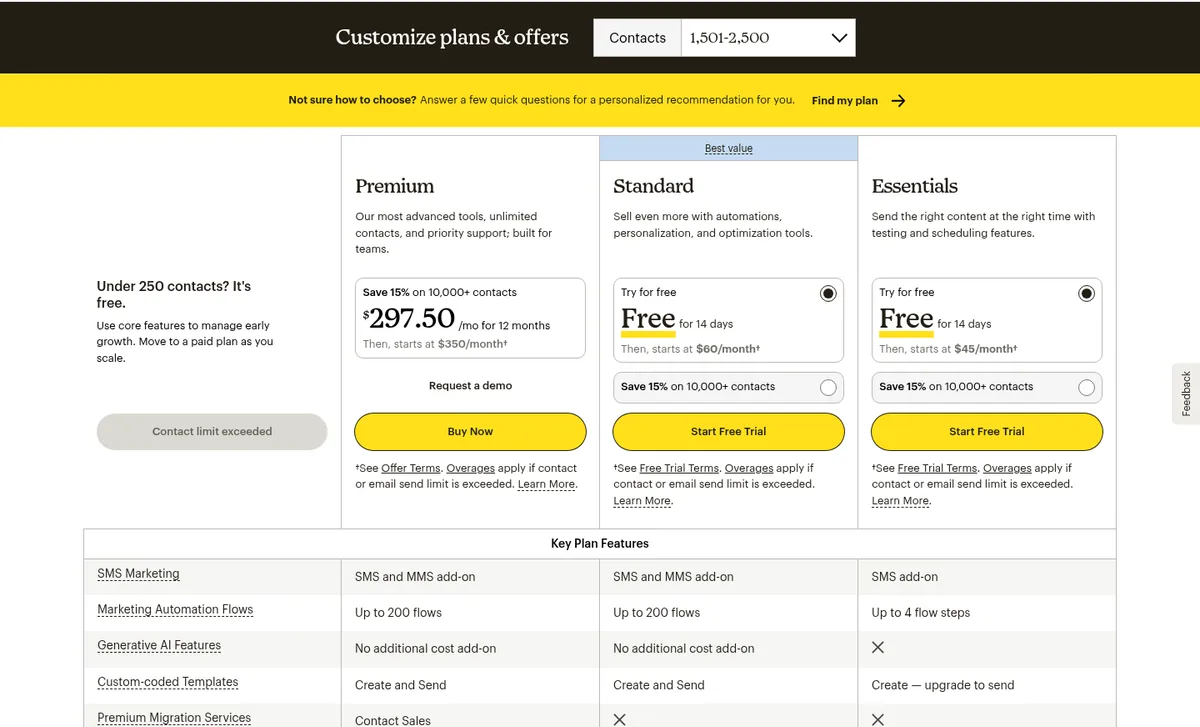
Sending limits
This is the biggest structural difference for anyone who sends often.
- beehiiv: no send limits on any plan. The FAQ says you’re “never penalized for sending more often or for emailing your full list.”
- Mailchimp: monthly sends are a multiple of your contact limit: 10× on Essentials, 12× on Standard, 15× on Premium. Free is capped at 500 per month or 250 per day. On paid plans, Mailchimp’s FAQ says that after the free trial, going over your contact or send limit means Mailchimp automatically bills you for overages. Its help article adds that it won’t interrupt service when you go over your contact limit mid-cycle; you’ll see an additional charge.
For a weekly newsletter, 10× is roughly two sends per week to your full list; a daily newsletter would blow past it. That’s simple arithmetic from Mailchimp’s published multipliers, but it’s worth doing for your own send schedule before you choose.
Automations
- beehiiv: Free includes a welcome email but no custom automations. Lite includes 10 live custom automations, with triggers such as signup, form submission, segment changes, tags, paid subscription purchase or cancellation, and unengaged subscribers, plus delays, tags, and true/false branches. Pro makes custom automations unlimited and adds click-triggered automations and A/B split conditions.
- Mailchimp: Free has no automation flows. Essentials includes single email automations and flows up to 4 steps. Standard and Premium list up to 200 flows, plus flow templates, advanced segmentation, and (per Mailchimp’s disclaimers) automations tied to connected stores.
If your automations are newsletter-shaped (welcome series, re-engagement, paid-subscriber onboarding), beehiiv Lite covers that. If they’re store-shaped (abandoned carts, post-purchase follow-ups, multi-branch customer journeys), Mailchimp Standard is built for it.
Monetization: paid subscriptions, ads, and recommendations
beehiiv builds monetization into the plans:
- Paid subscriptions on Lite and above. beehiiv’s FAQ says it takes 0% of paid subscription and digital product revenue; you pay Stripe’s standard 2.9% + $0.30 per transaction.
- Ad network, programmatic ads, paid recommendations, coupons, and metered paywalls on Lite+.
- Pro adds paid trials, group subscriptions, and a sponsorship storefront.
- Digital products on every plan (Free 1 product, Lite 3, Pro unlimited).
- The recommendation network (for growth) is on Free; the referral program starts on Lite.
Mailchimp’s marketing pricing page and plan help article don’t present paid newsletter subscriptions, a newsletter ad network, or paid recommendations. Mailchimp’s model is marketing for a business (driving store orders, bookings, or leads), not charging readers for the newsletter itself. If reader revenue or sponsorships are your plan, beehiiv documents that path and Mailchimp doesn’t.
For how beehiiv’s paid features compare with Substack’s fee model, see beehiiv vs Substack.
Website and landing pages
beehiiv treats the website as part of the publication: the feature table lists a website builder, templates, and web hosting on every plan, with custom pages at 1 (Free), 5 (Lite), or unlimited (Pro). Custom domains start on Lite, and removing beehiiv branding starts on Pro. beehiiv’s FAQ says website, podcast, community, and digital products are included on every plan; what changes as you move up is limits and advanced features.
Mailchimp lists popup forms on all plans, including Free, and its help article says Free users can try landing pages and forms. Mailchimp’s free-trial terms list Website plans among separate add-on fees, so a full Mailchimp website is priced apart from the marketing plan. Mailchimp’s real strength is connecting email to an existing store or site, not hosting a newsletter archive.
When Mailchimp is the better fit
Be honest about this: Mailchimp wins for a lot of small businesses.
- You run a store. Mailchimp markets automation flows for connected stores, predictive segments (Standard and Premium only), and its pricing-page claims center on ecommerce orders and revenue.
- You need SMS. SMS marketing is a Mailchimp add-on on paid plans in select markets (application required; credits renew monthly and don’t roll over), with MMS on Standard and Premium for US and Canadian contacts. beehiiv’s pricing page doesn’t list SMS.
- You need transactional email. Mailchimp Transactional is an add-on for Standard and Premium (not Essentials), sold in blocks of 25,000 emails at $20 per block for 1–20 blocks. beehiiv doesn’t present a separate transactional product on its pricing page.
- You manage several separate lists, such as for different locations or brands (Essentials 3 audiences, Standard 5, Premium unlimited).
- Your list is small and you send rarely. Essentials starts at $13/month for up to 500 contacts, and Pay As You Go credits exist for infrequent senders.
- Your team already knows Mailchimp and your flows, forms, and integrations would be costly to rebuild.
When beehiiv is the better fit
- The newsletter is the business, or a big part of it
- You want to grow to 2,500 subscribers for $0 with unlimited sends
- You plan to charge readers, sell sponsorships, or join an ad network
- You want a publication website and archive without a separate website plan
- You send often (daily or several times a week) and don’t want to think about send multipliers
- You want a paid-plan trial without entering a credit card
Migrating from Mailchimp
beehiiv has an official guide, How to migrate from Mailchimp to beehiiv, marked for all plans. In summary, from that article:
- Subscribers: export your audience as a CSV from Mailchimp, then upload it in beehiiv under Settings > Subscribers Import. You can map columns to custom fields and Mailchimp tags to subscriber tags, and you confirm that everyone opted in.
- Past campaigns: beehiiv’s Content Import tool connects to your Mailchimp account and imports all campaigns or selected folders. It supports campaigns built with Mailchimp’s New Email Builder (launched 2022); campaigns built with the Legacy Email Builder won’t import and may need to be recreated by hand.
- Things to know: imported subscribers get the import date as their subscription date by default (beehiiv support can add original dates on request). beehiiv recommends excluding unengaged subscribers (Mailchimp contact rating 1 or 2) from your first 2–4 weeks of sends. Mailchimp automations have to be rebuilt with beehiiv Automations.
For the full step-by-step process (cleaning the export, segmenting by contact rating, rebuilding forms and automations, and winding down Mailchimp), see our Mailchimp to beehiiv migration guide.
If you’re leaving Mailchimp but want a creator email tool rather than a publication platform, our Mailchimp to Kit migration guide covers that route.
Which should you pick?
| Your situation | Better fit (based on documented features and pricing) |
|---|---|
| Starting a newsletter from zero, want free growth room | beehiiv Free (up to 2,500 subscribers, unlimited sends) |
| Paid newsletter, sponsorships, or ad revenue | beehiiv Lite or Pro |
| Daily or very frequent sends | beehiiv (no send limits) |
| Online store with abandoned-cart and post-purchase emails | Mailchimp Standard |
| Need SMS or transactional email alongside marketing | Mailchimp (paid plans; Transactional needs Standard or Premium) |
| Tiny list, occasional sends, lowest possible bill | Mailchimp Essentials or Pay As You Go |
| Want creator automations without a publication site | Compare Kit (Kit vs Mailchimp) |
| Still choosing among beginner tools | Read Best newsletter platform for beginners |
What we’ll add after hands-on testing
Once we’ve set up accounts on both platforms, we can update this comparison with:
- Screenshots of both editors, automation builders, and analytics from those accounts
- How long a basic welcome email takes to set up on each
- Notes on a real Mailchimp-to-beehiiv subscriber and content import
Until then, treat this as a pricing-and-feature map from official sources, not a performance review.
Sources
All checked October 5, 2026.
- beehiiv: Pricing (Free / Lite / Pro / Enterprise plan cards; monthly and yearly prices at 1,000, 2,500, 5,000, and 10,000 subscribers; feature comparison table; FAQ on unlimited sends, subscriber counting, trials, yearly savings, and 0% take)
- beehiiv: How to migrate from Mailchimp to beehiiv (help article, last updated Nov 21, 2025)
- Mailchimp: Marketing plans and pricing (plan cards at 0–500, 501–1,500, 1,501–2,500, 2,501–5,000, and 5,001–10,000 contacts; Key Plan Features table; FAQ; offer and free-trial terms)
- Mailchimp: About Mailchimp pricing plans (Free limits, plan contact caps, send multipliers, overage behavior)
- Mailchimp: Transactional email pricing (block pricing, plan eligibility)
- Related AudienceBench guides: Kit vs Mailchimp, beehiiv pricing explained, beehiiv vs Substack, Best newsletter platform for beginners, Migrate Mailchimp to Kit, Migrate Mailchimp to beehiiv