
Kit Pricing Explained (2026): Free, Creator, and Pro at Every Tier
Kit (formerly ConvertKit) pricing in 2026: what Free, Creator, and Pro cost from 1,000 to 95,000 subscribers, what each plan adds, and the fees to plan for.
Kit (the company formerly called ConvertKit) has three plans: Free, Creator, and Pro. Free covers up to 10,000 subscribers, which is unusually generous. Creator and Pro are priced by how many subscribers you have, and Kit says there are no sending limits on any plan. The catch most people run into is that automations, including a simple welcome sequence, start on Creator, and the price you pay when you upgrade depends on how big your list already is.
This guide lays out every tier on Kit’s pricing page as it appeared when we re-checked it on October 7, 2026 (first published September 27), including a limited-time Pro discount Kit is running through November 7, 2026, what each plan unlocks, and the fees and billing rules worth knowing. Prices are in USD. Kit updates pricing and features from time to time, so confirm on Kit’s pricing page before you buy.
How we researched this: This guide is based on Kit’s official pricing page, plan comparison table, and FAQ. We haven’t tested Kit’s plans hands-on. The screenshot is a capture of Kit’s public pricing page, not of an account.
Kit pricing at a glance
| Plan | Price | Subscriber limit | Users | Who it’s for |
|---|---|---|---|---|
| Free | $0 | Up to 10,000 | 1 | Building an audience; manual broadcasts |
| Creator | From $39/mo monthly, or $33/mo billed yearly (1,000 subs) | Priced by tier | 2 | Anyone who wants automations, sequences, or no Kit branding |
| Pro | From $79/mo monthly, or $66/mo billed yearly (1,000 subs); limited-time offer: $50/mo for the first year, billed yearly (ends Nov 7, 2026) | Priced by tier | Unlimited | Established creators and teams who want deeper analytics, deliverability reporting, and a referral program |
Source: Kit pricing, checked October 7, 2026.
Both paid plans come with a 14-day free trial with no credit card required, and Kit offers refunds within the first 30 days on monthly or annual plans, according to its pricing FAQ.
What Kit costs at every subscriber tier
Kit’s pricing page has a subscriber slider. Here’s what it showed for each step up to 95,000 subscribers on October 7, 2026 (unchanged from September 27). The slider continues above 100,000.
Monthly billing
| Subscribers | Creator | Pro |
|---|---|---|
| 1,000 | $39/mo | $79/mo |
| 3,000 | $59/mo | $99/mo |
| 5,000 | $89/mo | $139/mo |
| 8,000 | $119/mo | $169/mo |
| 10,000 | $139/mo | $189/mo |
| 15,000 | $169/mo | $249/mo |
| 20,000 | $189/mo | $269/mo |
| 25,000 | $199/mo | $279/mo |
| 35,000 | $259/mo | $363/mo |
| 45,000 | $319/mo | $447/mo |
| 55,000 | $379/mo | $519/mo |
| 65,000 | $439/mo | $591/mo |
| 75,000 | $499/mo | $663/mo |
| 85,000 | $559/mo | $735/mo |
| 95,000 | $619/mo | $807/mo |
Source: Kit pricing, checked October 7, 2026.
Annual billing
| Subscribers | Creator (per month) | Creator (billed yearly) | Pro standard (per month) | Pro standard (billed yearly)* |
|---|---|---|---|---|
| 1,000 | $33 | $390 | $66 | $790 |
| 3,000 | $50 | $590 | $83 | $990 |
| 5,000 | $75 | $890 | $116 | $1,390 |
| 8,000 | $100 | $1,190 | $141 | $1,690 |
| 10,000 | $116 | $1,390 | $158 | $1,890 |
| 15,000 | $141 | $1,690 | $208 | $2,490 |
| 20,000 | $158 | $1,890 | $225 | $2,690 |
| 25,000 | $166 | $1,990 | $233 | $2,790 |
| 35,000 | $216 | $2,590 | $303 | $3,630 |
| 45,000 | $266 | $3,190 | $373 | $4,470 |
*Pro’s standard yearly totals are as shown on September 27, 2026. While the limited-time offer below is running, Kit’s page shows Pro’s discounted first-year total instead of the standard yearly total, so we couldn’t re-check this column on October 7. Every other figure in this table was re-checked on October 7, 2026 and was unchanged.
Kit advertises “Pay yearly—save 17%.” In dollars: Creator at 1,000 subscribers is $390 a year billed yearly vs. $468 paid monthly (Kit’s page says “Save $78 per year”). At 10,000 subscribers, Creator is $1,390 a year vs. $1,668, a $278 difference.
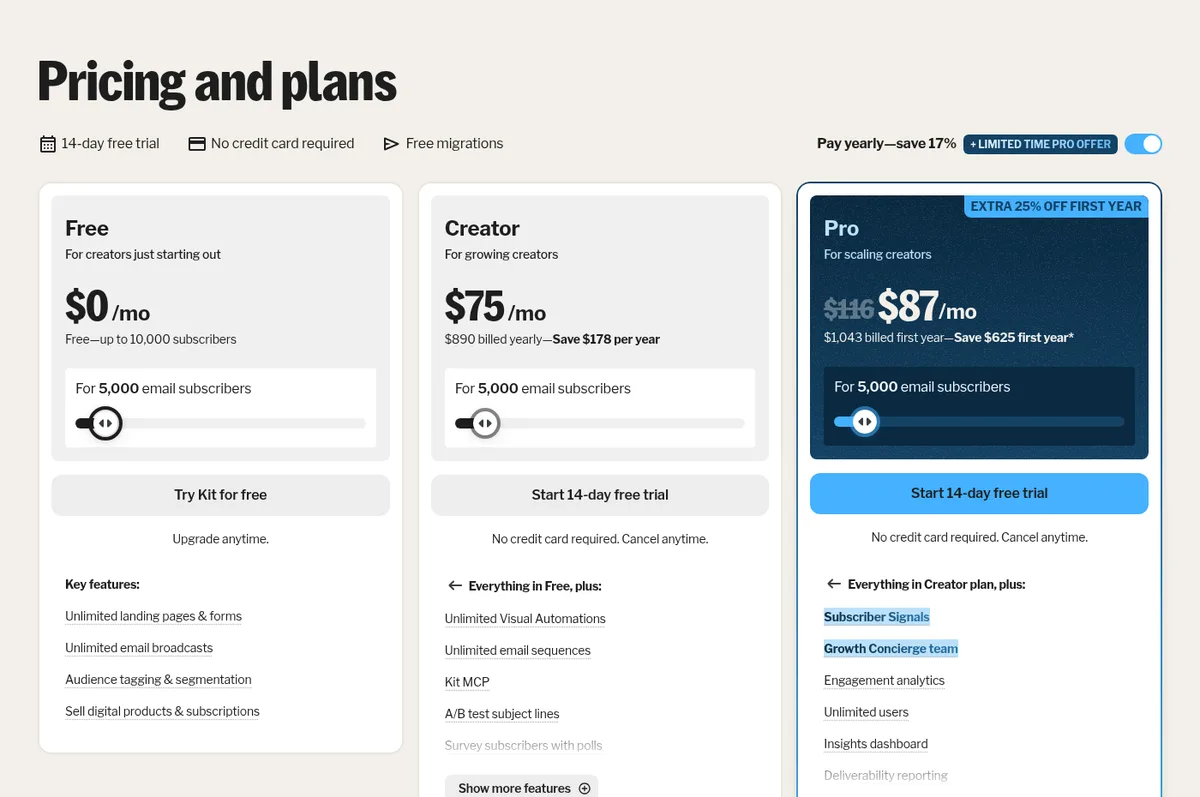
Limited-time offer: 25% off the first year of Pro (through November 7, 2026)
As of October 7, 2026, Kit’s pricing page advertises a limited-time Pro offer: “Extra 25% off first year” on annual Pro plans. According to the offer details on Kit’s pricing page:
- The 25% discount applies to the first year of an annual Pro plan for lists up to 65,000 subscribers. Lists of 65,001 to 500,000 subscribers get 10% off their first year.
- The offer ends November 7, 2026.
- After the first year, the plan renews at the standard annual Pro rate.
- Kit notes that Subscriber Signals (one of Pro’s features) “is available once your paid Pro plan begins.”
Here’s what the page showed for annual Pro with the offer applied, compared with the standard rate:
| Subscribers | Pro standard (per month, billed yearly) | Pro first year with offer (per month) | Pro first year with offer (billed first year) |
|---|---|---|---|
| 1,000 | $66 | $50 | $593 |
| 3,000 | $83 | $62 | $743 |
| 5,000 | $116 | $87 | $1,043 |
| 10,000 | $158 | $119 | $1,418 |
| 25,000 | $233 | $175 | $2,093 |
| 45,000 | $373 | $280 | $3,353 |
| 65,000 | $493 | $370 | $4,433 |
| 75,000 (10% off) | $553 | $498 | $5,967 |
Two things to know before you take the offer:
- It’s annual only. With monthly billing, Pro was still $79/month at 1,000 subscribers, with no discount shown.
- Kit’s “Save $355 first year” figure compares against paying monthly. At 1,000 subscribers, 12 months of monthly Pro is $948 ($79 × 12); the first-year offer total is $593. Kit describes the discount itself as 25% off the first year of an annual Pro plan (10% for lists over 65,000).
Limited-time offers change, so confirm the terms on Kit’s pricing page before you buy. The offer doesn’t change our recommendation below: start on Creator unless you need a Pro feature. If you do need Pro, the offer lowers your first-year cost but not what you’ll pay at renewal.
Source: Kit pricing (Pro plan card and “See offer details”), checked October 7, 2026.
What the Free plan includes
Kit Free covers up to 10,000 subscribers and 1 user. Kit’s plan card and comparison table list:
- Unlimited landing pages and forms (with templates) and unlimited traffic
- Unlimited email broadcasts, with no sending limits
- Subscriber tagging and segmentation
- A newsletter feed and website, and a customizable Kit domain or your own custom domain
- Sell digital products and subscriptions, including paid newsletters and tip jars
- Free Recommendations through Kit’s creator network, plus Smart Recommendations
- Opt-in incentive delivery, list growth reporting, and an unsubscribe page builder
- The email template library, custom HTML/CSS templates, and Liquid-based conditional content
- Subject-line A/B tests with 2 subject lines, according to Kit’s comparison table (the plan cards list A/B testing under Creator)
What Free doesn’t include: email sequences, visual automations, RSS campaigns, removal of Kit branding, apps and integrations from the Kit App Store, more than one user, and 24/7 email and chat support (Free users get Kit’s product support, which Kit says is mostly handled by its AI assistant).
When Free is enough: you send a regular newsletter by hand, you’re under 10,000 subscribers, and you can live without an automated welcome email. You can even start charging for a paid newsletter on Free.
What Creator adds
Creator is where Kit’s automation tools switch on. Everything in Free, plus:
- Unlimited visual automations and a visual automation template library
- Unlimited email sequences (welcome series, courses, nurture emails)
- RSS campaigns (send an email automatically when your blog’s RSS feed updates)
- Remove Kit branding from landing pages, emails, and product pages
- A/B testing of subject lines (listed on Creator’s plan card; see the note under Free)
- Subscriber polls and SMS marketing
- 100+ direct app integrations (Kit App Store) and the Kit MCP for connecting AI assistants
- Paid Recommendations (Kit takes a 23.5% fee on those earnings) and Newsletter sponsorships
- Email editor version history and scheduling in each subscriber’s time zone
- Abandoned checkout recovery for Shopify, Fourthwall, and Wix
- 2 users
- 24/7 email and chat support
- Kit’s free migration service (its in-house team rebuilds forms, templates, and automations)
For most solo creators, Creator is the plan to compare against other platforms, because it’s the cheapest Kit plan with automations.
What Pro adds
Pro includes everything in Creator, plus:
- Unlimited users and collaborative editing
- Newsletter referral system, delivered as a free SparkLoop plan (Kit values it at $99/month)
- Advanced A/B testing (up to 5 subject lines, or content tests)
- Deliverability reporting and an insights dashboard
- Subscriber engagement scoring, engagement analytics, and Subscriber Signals (demographic and engagement data on subscribers)
- Facebook custom audiences sync
- Edit links in sent broadcasts
- A custom tracking domain
- A Growth Concierge team (Kit describes quarterly performance audits and direct access to its in-house email strategist, deliverability specialist, and solutions team)
- 24/7 priority email and chat support
Source: Kit pricing, checked October 7, 2026.
Creator or Pro: how to decide
Start with Creator unless you already know you need one of Pro’s features. Pro makes sense if:
- You have a team. Creator allows 2 users; Pro is unlimited.
- You want a referral program (“refer 3 friends, get a reward”). On Kit, that’s Pro.
- Deliverability and analytics matter to your revenue, for example if you sell sponsorships and want engagement scoring and deliverability reports.
- You make link mistakes and want to fix them after sending.
The price gap between the two plans is $40/month at 1,000 subscribers ($79 vs. $39 monthly) and grows with your list: $50 at 10,000, $80 at 25,000, and $188 at 95,000. Through November 7, 2026, the limited-time offer above narrows the gap for the first year if you pay annually.
Source: Kit pricing, checked October 7, 2026.
Fees, billing rules, and things people miss
- Commerce fee: 3.5% + 30¢ per digital product or subscription sale, on every plan. Kit says this figure includes credit card processing and that Kit’s own share is 0.6%. On an $8/month subscription, that’s about $0.58 per payment.
- Paid Recommendations fee: 23.5% of what you earn through Paid Recommendations (Creator and Pro).
- Automatic upgrades. Kit’s FAQ says that when you go over your plan’s subscriber limit, it automatically upgrades you to the next tier.
- Manual downgrades. If you clean your list and drop below your tier, Kit’s FAQ says its team currently has to downgrade you manually; email [email protected].
- Only unique, active subscribers count toward your limit, according to Kit’s comparison table.
- Upgrading from Free with a big list costs more. Paid prices follow your subscriber count, so if you grow to 8,000 subscribers on Free and then want automations, you’ll pay the 8,000-subscriber Creator price ($119/month, or $100/month billed yearly), not the $39 starting price.
- No sending limits on any plan, so frequent senders don’t pay extra.
Source: Kit pricing, checked October 7, 2026.
How Kit compares on price
Two quick reference points, both from official pricing pages checked October 7, 2026:
- beehiiv’s free plan covers up to 2,500 subscribers (vs. Kit’s 10,000). beehiiv’s plans are now called Free, Lite, and Pro (plus Enterprise). Its cheapest paid plan with custom automations and paid subscriptions, Lite, is $59/month on monthly billing or $49/month billed yearly at 1,000 subscribers; Pro is $109/month monthly or $95/month billed yearly. At 10,000 subscribers, beehiiv Lite and Kit Creator are both $139/month on monthly billing. beehiiv Lite is cheaper on bigger lists: $299/month at 50,000 subscribers (Kit Creator: $319 at 45,000, $379 at 55,000) and $469/month at 100,000 (Kit Creator: $619 at 95,000). Lite tops out at 100,000 subscribers. See our beehiiv pricing guide and Kit vs beehiiv comparison.
- Substack is free to publish but takes 10% of paid subscriptions, plus Stripe fees (Substack help center). Kit’s 3.5% + 30¢ is lower per transaction, but Substack charges nothing if you never enable paid subscriptions.
Our recommendation
Based on Kit’s documented features and pricing:
- Start on Free if you’re building a list and sending a newsletter by hand. Its 10,000-subscriber limit is four times beehiiv’s free plan and far above Mailchimp’s 250-contact free plan, and it lets you sell subscriptions and digital products from day one. (Substack is free at any size, but takes 10% once you charge.)
- Upgrade to Creator when you want a welcome sequence, automations, RSS-to-email, or no Kit branding. Upgrade before your list gets big if automations are in your plans, because the price rises with subscriber count. Use the 14-day trial to set things up.
- Choose Pro if you have a team, want a built-in referral program, or rely on deliverability and engagement data for sponsorship revenue. If you’re sure you need Pro, paying annually before November 7, 2026 gets you the limited-time first-year discount; the price goes back to the standard rate at renewal.
- Look elsewhere if you want a publication-style website with 0% platform fees on paid subscriptions, or if your list is very large. beehiiv Lite costs the same as Kit Creator at 10,000 subscribers on monthly billing and less at 50,000 and up.
FAQ
Is Kit free?
Yes. Kit’s Free plan costs $0 for up to 10,000 subscribers, with unlimited landing pages, forms, and broadcasts. It doesn’t include email sequences or visual automations.
Source: Kit pricing, checked October 7, 2026.
How much does Kit cost per month?
Creator starts at $39/month (1,000 subscribers, monthly billing) or $33/month billed yearly. Pro starts at $79/month, or $66/month billed yearly at the standard rate. Through November 7, 2026, Kit’s limited-time offer takes 25% off the first year of annual Pro ($50/month, $593 billed for the first year, at 1,000 subscribers). At 10,000 subscribers, Creator is $139/month and Pro is $189/month on monthly billing.
Source: Kit pricing, checked October 7, 2026.
Is Kit the same as ConvertKit?
Yes. Kit’s website describes itself as “Formerly ConvertKit.”
Does Kit limit how many emails I can send?
No. Kit’s FAQ says there are no sending limits on any plan, including Free.
What happens when my Kit trial ends?
According to Kit’s FAQ, you add a credit card to keep using Creator or Pro, or you continue on the Free plan. No card is needed to start the 14-day trial.
Can I run a paid newsletter on Kit’s free plan?
Yes. Kit lists “Sell digital products & subscriptions” and paid newsletters on the Free plan. The 3.5% + 30¢ transaction fee applies on every plan.
Does Kit offer refunds?
Kit’s FAQ says it will refund monthly or annual plans within the first 30 days after you sign up.
Will Kit move my list for me?
Kit offers a free migration service on paid plans. If you’re coming from Mailchimp and want to do it yourself, see our Mailchimp to Kit migration guide.
Sources
- Kit: Pricing and plans, including the subscriber slider (monthly and yearly), plan cards, limited-time Pro offer details, comparison table, and FAQ. Checked October 7, 2026, except Pro’s standard yearly totals, which are as shown September 27, 2026 (see the note under the annual table).
- beehiiv: Pricing, including the subscriber slider (monthly and yearly) and Free, Lite, and Pro plan cards. Checked October 7, 2026.
- Mailchimp: Marketing plans and pricing (Free plan: under 250 contacts). Checked October 7, 2026.
- Substack: How much does Substack cost?. Checked October 7, 2026.
The September 27, 2026 version of this guide described beehiiv’s previous plans (Launch, Scale, and Max). beehiiv’s pricing page showed the new Free, Lite, and Pro plans when we re-checked on October 1, 2026, and this update reflects them.