
HubSpot vs Kit (2026): Which Is Better for Small Businesses?
HubSpot vs Kit for small businesses in 2026: free email limits, Starter vs Creator pricing, CRM vs creator tools—cited to official pages.
HubSpot and Kit both send marketing email, but they are built for different jobs. HubSpot is a CRM and marketing platform (Marketing Hub plus free CRM tools) aimed at businesses that want leads, pipelines, and multi-channel campaigns in one stack. Kit (formerly ConvertKit) is a creator and newsletter toolkit—landing pages, tags, broadcasts, automations, and a way to sell digital products or a paid newsletter—priced by subscriber count.
For a small business choosing between them, the free-plan gap is usually the first filter: Kit Free covers up to 10,000 subscribers with no sending limits, while HubSpot Free email allows 2,000 sends per calendar month with HubSpot branding. Paid HubSpot then jumps from a cheap Starter seat promo into Professional at $800/month (billed annually)—a different budget class than Kit Creator from $39/month at 1,000 subscribers.
This comparison is based on each vendor’s official Marketing Hub / Kit pricing pages, plan comparison tables, and FAQs, checked on October 2, 2026. Prices are in USD and change often, so confirm on HubSpot’s Marketing Hub pricing and Kit’s pricing page before you commit.
How we researched this: We haven’t tested HubSpot or Kit hands-on for this article. Everything below comes from each vendor’s official documentation and public pricing pages. The screenshots are captures of those public pricing pages, not of our own accounts.
About our links: HubSpot and Kit links on this page are affiliate-style
/go/links (/go/hubspot, /go/kit). Where we mention beehiiv as a newsletter-first alternative, that link is also affiliate (/go/beehiiv). Our recommendations would be the same either way.
Quick picks
- Choose Kit if email/newsletter growth is the main job—especially if you want a large free plan, uncapped sends, creator commerce (paid newsletter / digital products), and automations once you upgrade to Creator.
- Choose HubSpot if you need a CRM-first marketing stack—forms, live chat, ads, and marketing contacts tied to a sales pipeline—more than a creator newsletter toolkit. Free and Starter can work for light email; treat Professional as a team marketing buy, not a newsletter upgrade.
- Want a publication website and 0% platform take on paid subs? Also compare beehiiv in our beehiiv vs Substack and Kit vs beehiiv guides.
- Deep dive on HubSpot’s free email limits: HubSpot free email marketing.
Try Kit free · See HubSpot free tools
At a glance
| HubSpot (Marketing Hub) | Kit | |
|---|---|---|
| Positioning | CRM + marketing platform for businesses | Creator / newsletter toolkit (formerly ConvertKit) |
| Free plan | $0/mo, up to 2 users, no credit card | $0/mo, up to 10,000 subscribers, 1 user |
| Free email sending | 2,000 sends per calendar month, with HubSpot branding | No sending limits on any plan (Kit FAQ) |
| Free automation | 1 automated action | Tags/segmentation yes; sequences & visual automations start on Creator |
| Cheapest paid (entry) | Starter promo $7/mo/seat annual or $10/mo/seat monthly (regular $20/mo/seat); 1,000 marketing contacts | Creator: $39/mo monthly or $33/mo yearly (1,000 subscribers) |
| Next major paid step | Professional: $800/mo annual / $890/mo monthly (+ required $3,000 onboarding) | Pro: $79/mo monthly or $66/mo yearly (1,000 subscribers) |
| Paid send model | Starter 5× / Professional 10× / Enterprise 20× marketing contact tier per month (FAQ) | No sending limits (FAQ) |
| Commerce / paid newsletter | Not positioned as a paid-publication host on Marketing Hub pricing | Sell digital products & subscriptions on all plans, including Free; fee 3.5% + 30¢ (includes card processing) |
| Team seats (entry) | Free 2 users; Starter priced per seat; Professional includes 3 Core Seats | Free 1 · Creator 2 · Pro unlimited |
| Best for | Small businesses that want CRM + marketing in one platform | Creators and newsletter-led small businesses |
| Affiliate note | We link via /go/hubspot | We link via /go/kit |
Sources: HubSpot Marketing Hub pricing, Kit pricing, checked October 2, 2026.
Free plans: HubSpot Free vs Kit Free
This is where most small businesses feel the difference first.
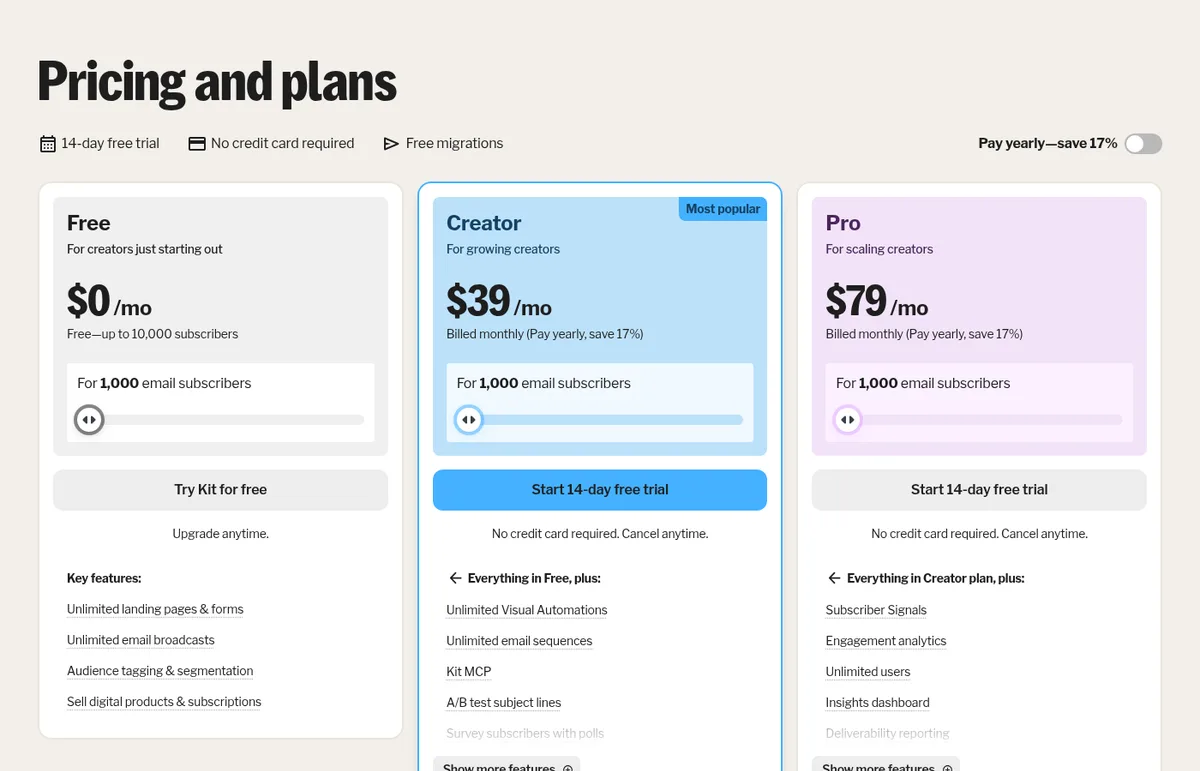
Kit Free is $0/month for up to 10,000 subscribers and 1 user. Kit’s plan card lists unlimited landing pages and forms, unlimited email broadcasts, audience tagging and segmentation, and the ability to sell digital products and subscriptions. Kit’s FAQ states: “There are no sending limits on any of our plans at Kit.” What’s missing on Free: email sequences, visual automations, RSS campaigns, removal of Kit branding, and more than one user. You can grow and send a weekly newsletter by hand for a long time; you cannot run an automated welcome series until Creator.
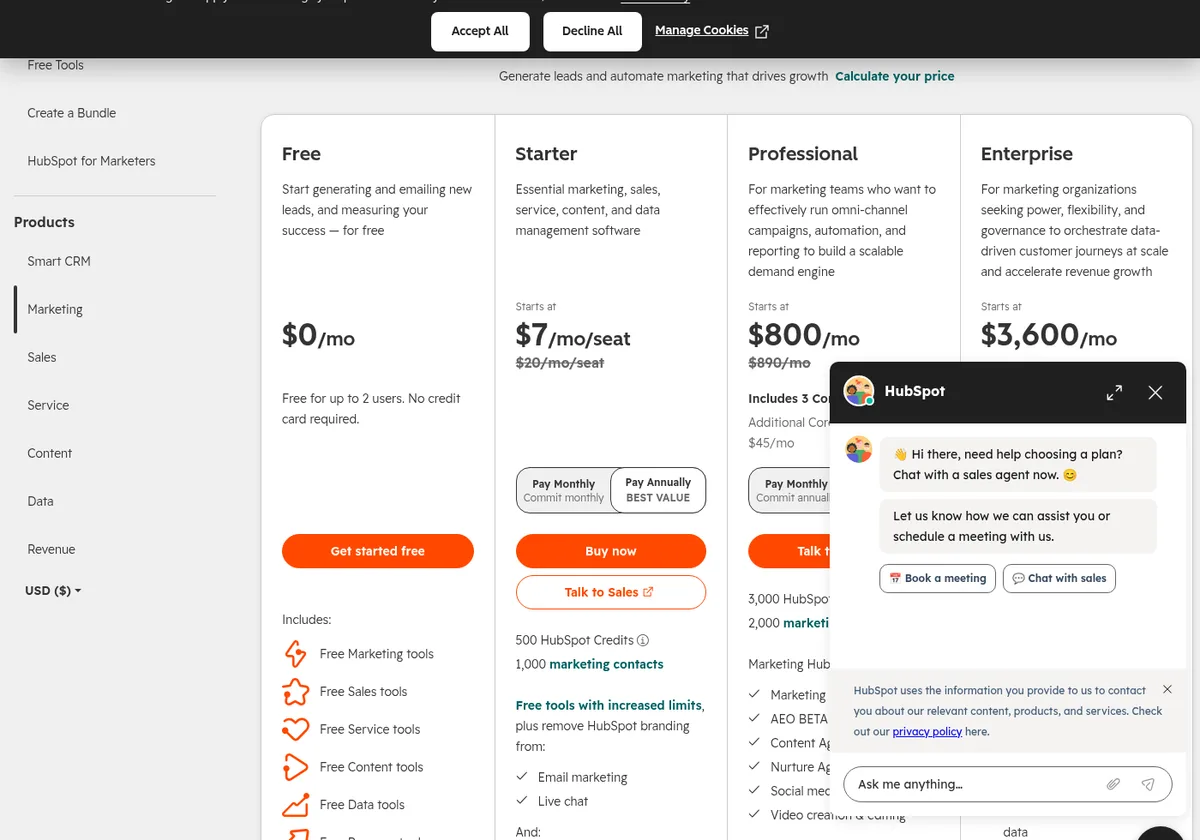
HubSpot Free is $0/month for up to 2 users, no credit card required, and includes free Marketing (and other) tools on the Marketing Hub pricing page. For email specifically, the comparison table lists 2,000 email sends per calendar month, with HubSpot branding, and email automation of 1 automated action. That is enough for occasional campaigns or a very light nurture trigger—not a high-frequency newsletter to thousands of people.
Bottom line: if your primary channel is a growing email list, Kit Free lasts much longer. If your primary need is a free CRM plus light branded HubSpot email while you test the platform, HubSpot Free is the documented fit—just plan around the 2,000-send/month ceiling.
Paid pricing for small businesses
Kit Creator and Pro
Kit prices Creator and Pro by subscriber count. On October 2, 2026, at 1,000 subscribers:
| Billing | Kit Creator | Kit Pro |
|---|---|---|
| Monthly | $39/mo | $79/mo |
| Yearly (shown as $/mo) | $33/mo ($390 billed yearly) | $66/mo ($790 billed yearly) |
At 3,000 subscribers the same day: Creator $59/mo monthly / $50/mo yearly; Pro $99/mo monthly / $83/mo yearly.
Kit advertises “Pay yearly—save 17%.” Paid plans include a 14-day free trial with no credit card, and Kit offers free migrations from another platform on paid plans. Creator unlocks unlimited visual automations, unlimited email sequences, apps/integrations, RSS campaigns, remove Kit branding, and 24/7 email & chat support. Pro adds deliverability reporting, unlimited users, engagement analytics, Subscriber Signals, collaborative editing, and a newsletter referral system (free SparkLoop plan called out on the page).
Full tier tables: Kit pricing explained.
HubSpot Starter, Professional, and Enterprise
Marketing Hub Starter is the first paid step. On October 2, 2026, HubSpot showed a limited-time “Save up to 65% on Starter” banner for new customers only:
- Promo $7/month per seat when you Pay Annually, or $10/month per seat when you Pay Monthly
- Regular price listed as $20/month per seat
- 1,000 marketing contacts included; 500 HubSpot Credits
- Remove HubSpot branding from email marketing and live chat
- Simple marketing automation (comparison table: up to 10 automated actions)
- Monthly email sends at 5× your marketing contact tier (FAQ)—at the included 1,000 contacts, that is 5,000 sends/month
- Onboarding is not required on Starter (Inbound Consulting optional for an extra fee, per FAQ)
Starter is priced per seat. Multiply if more than one person needs a seat.
Professional is a different budget:
- $800/month billed annually, or $890/month paid monthly
- Includes 3 Core Seats (extra seats from $45/mo annual / $50/mo monthly)
- 2,000 marketing contacts included; sends at 10× the contact tier (FAQ)
- Required one-time Professional Onboarding for $3,000 (called out on the plan card)
Enterprise starts at $3,600/month, includes 5 Core Seats and 10,000 marketing contacts, sends at 20× the contact tier (FAQ), and a required one-time Enterprise Onboarding fee of $7,000.
Sources: Kit pricing and HubSpot Marketing Hub pricing, checked October 2, 2026.
Rough cost contrast (platform fee only)
| Scenario | Kit path (public prices) | HubSpot path (public prices) |
|---|---|---|
| Solo list under 10k, manual sends | Kit Free $0 | HubSpot Free $0, but 2,000 sends/mo cap |
| Need welcome sequences / automations | Kit Creator ~$39/mo at 1k (monthly) | Starter promo $7–$10/mo/seat (up to 10 actions) or jump to Professional |
| Full marketing team omnichannel | Kit Pro helps creators/teams; not a CRM suite | Professional $800/mo annual + $3,000 onboarding |
For many small businesses that mainly need email and a signup funnel, Kit’s documented ladder stays lower for longer. HubSpot’s Starter promo can be cheap for light branded email plus CRM—but the leap to Professional is large.
Automations and CRM
- Kit: tagging and segmentation exist on Free; automated email sequences and the visual automation builder start on Creator. That is the natural upgrade when you want a welcome series, lead-magnet delivery, or behavior-based paths without leaving a creator stack.
- HubSpot: Free allows 1 automated action. Starter raises that to up to 10 automated actions. Professional and Enterprise list unlimited actions plus broader omni-channel automation on the comparison table. HubSpot’s bigger advantage is the Smart CRM surrounding those emails—marketing contacts, deals, and (on higher hubs) sales/service workflows—not newsletter-style broadcast tools alone.
If your “small business” is really a solo creator or content brand, Kit’s automation unlock at Creator is usually the simpler documented path. If you already live in a CRM and need marketing email tied to sales stages, HubSpot is built for that.
Landing pages, forms, and list growth
Kit lists unlimited landing pages and forms on Free, Creator, and Pro, with templates, custom domains (or a Kit domain), opt-in incentive delivery, and list-growth reporting.
HubSpot includes forms, live chat, and related free/paid marketing tools as part of the broader free-tools and Marketing Hub packaging. Starter specifically calls out removing HubSpot branding from email and live chat. HubSpot is stronger when those forms should create CRM contacts for sales follow-up; Kit is stronger when the page’s only job is growing a newsletter list.
Commerce and monetization
Kit treats creator commerce as a first-class feature on every plan, including Free: digital products, paid newsletters, recurring subscriptions, and tip jars. The transaction fee on the pricing page is 3.5% + 30¢, stated as inclusive of credit card processing.
HubSpot Marketing Hub pricing does not present a Substack-style paid newsletter product. Monetization on HubSpot is typically “market products/services through CRM + campaigns,” not “charge readers for the newsletter.” If your revenue is reader subscriptions or digital downloads, Kit documents that path; if your revenue is selling something else and email is the nurture channel, HubSpot’s model matches better.
For a publication-first alternative with named Free/Lite/Pro plans and 0% platform take on paid subscriptions (Stripe still applies), see beehiiv.
When Kit wins
Based on the documented plans and prices checked October 2, 2026:
- You want newsletter-first growth with a free plan that can pass a few thousand subscribers
- You need unlimited sends without a contacts × multiplier cap
- You want to sell a paid newsletter or digital products without upgrading first
- You’re fine managing audience with tags/segments rather than a full sales CRM
- Your paid budget for automations is closer to Kit Creator (~$39/mo at 1k) than HubSpot Professional
When HubSpot wins
Be honest: HubSpot is the better documented fit in several small-business situations.
- You need a CRM (contacts, deals, pipelines) and marketing email is one channel among forms, chat, and ads
- Multiple teammates need seats and you want HubSpot’s free tools across marketing/sales/service as a starting platform
- You’re evaluating Starter for branded email + simple automation while staying inside HubSpot
- You expect to grow into a marketing team product (Professional+) and can budget for seats, contact tiers, and onboarding
- Your list is small enough that HubSpot Free’s 2,000 sends/month is enough while you test
Which should you pick?
| Your situation | Better fit (based on documented features and pricing) |
|---|---|
| Starting an email list from zero; want free growth room | Kit Free (up to 10,000 subscribers, no send limits) |
| Need CRM + light marketing email | HubSpot Free or Starter |
| Need an automated welcome series on a creator budget | Kit Creator |
| Full demand-gen / omni-channel marketing team | HubSpot Professional (budget for onboarding) |
| Selling courses, tips, or a paid newsletter | Kit (commerce on all plans) |
| Want a publication website / ad network | Compare beehiiv as well |
| Unsure about HubSpot’s free email ceiling | Read HubSpot free email marketing |
What we’ll add after hands-on testing
Once we’ve set up accounts on both platforms, we can update this comparison with:
- Screenshots of both editors, automation builders, and CRM/contact views from those accounts
- How long a basic welcome email takes to set up on each
- Notes on importing a real list into Kit vs creating marketing contacts in HubSpot
Until then, treat this as a pricing-and-feature map from official sources—not a performance review.
Sources
All checked October 2, 2026.
- HubSpot: Marketing Hub pricing (plan cards, Pay Monthly / Pay Annually toggles, feature comparison table, FAQ on send multipliers and onboarding)
- Kit: Pricing and plans (plan cards, comparison table, FAQ including no sending limits, monthly and yearly billing)
- Related AudienceBench guides: HubSpot free email marketing, Kit pricing explained, Kit vs Mailchimp, Kit vs beehiiv, Best newsletter platform for beginners