
Kit vs beehiiv for Solo Newsletter Writers
Kit vs beehiiv for one-person newsletters: free plans, pricing at 1k to 25k subscribers, automations, and paid-subscription fees, all cited to official sources.
If you write a newsletter on your own, Kit and beehiiv are probably both on your shortlist. They overlap a lot: both have a free plan, unlimited sends, custom domains, paid subscriptions, and recommendation networks (on beehiiv, custom domains and paid subscriptions need a paid plan). The differences show up in how many subscribers the free plan covers, which plan unlocks automations, how each one takes its cut of paid revenue, and whether you want a publication website or an email-marketing toolkit.
This comparison is based on each vendor’s official pricing page and documentation, first published September 27, 2026 and re-checked on October 7, 2026. Between our September 27 and October 1 checks, beehiiv renamed its plans from Launch, Scale, and Max to Free, Lite, and Pro (plus Enterprise) and changed its prices; this article uses the current names and prices. Prices are in USD and change often, so confirm on Kit’s pricing page and beehiiv’s pricing page before you commit.
How we researched this: We haven’t tested Kit or beehiiv hands-on for this article. Everything below comes from each vendor’s official documentation and pricing pages. The screenshots are captures of the vendors’ public pricing pages, not of our own accounts.
The short answer
- Choose Kit if you want the largest free plan (up to 10,000 subscribers), plan to sell digital products or a paid newsletter from day one without upgrading, or care most about email automation (welcome sequences, tagging, funnels).
- Choose beehiiv if you think of your newsletter as a publication, with a website, archive, and possibly a podcast or community, and you want to monetize through paid subscriptions with 0% platform fee or beehiiv’s ad network.
- If you’re under 2,500 subscribers and not charging yet, both free plans work. Kit’s free plan lets you grow four times larger before you have to pay; beehiiv’s free plan includes its website builder and a welcome email (custom domains start on Lite).
Try Kit free · Try beehiiv free
At a glance
| Kit | beehiiv | |
|---|---|---|
| Free plan limit | Up to 10,000 subscribers | Up to 2,500 subscribers |
| Cheapest paid plan (1,000 subs, monthly billing) | Creator: $39/mo | Lite: $59/mo |
| Annual discount | “Save 17%” (Creator $33/mo at 1,000 subs, billed yearly) | “Saves up to 20%” (Lite $49/mo at 1,000 subs, billed yearly) |
| Paid-plan subscriber cap | None listed (“Unlimited” on Creator and Pro in Kit’s comparison table) | Lite up to 100,000; Pro up to 250,000; Enterprise custom |
| Email sends | Unlimited on all plans | Unlimited on all plans |
| Automations | Creator and up (sequences + visual automations) | Welcome email on Free; custom automations on Lite (up to 10 live) and Pro (unlimited); click-triggered automations on Pro |
| Paid subscriptions | Available on all plans, including Free | Lite and up |
| Platform fee on paid subscriptions | 3.5% + 30¢ per transaction, including card processing | 0% beehiiv fee; you pay Stripe (2.9% + $0.30 per beehiiv’s FAQ) |
| Built-in ad network / sponsorships | Newsletter sponsorships on Creator and up | beehiiv Ad Network on Lite and up |
| Referral program | Pro (via an included SparkLoop plan) | Lite and up |
| Remove platform branding | Creator and up | Pro and up |
| Team seats | Free 1, Creator 2, Pro unlimited | Free 1, Lite 2, Pro 10, Enterprise unlimited |
| Website | Newsletter feed & website, landing pages | Website builder on every plan; custom pages 1 (Free) / 5 (Lite) / unlimited (Pro) |
| Free migration help | Yes, in-house team, on paid plans | Not listed as a plan feature; beehiiv publishes self-serve migration guides and points to its paid beehiiv Experts Directory |
Sources: Kit pricing, beehiiv pricing, beehiiv’s Kit migration guide, all checked October 7, 2026.
Pricing compared
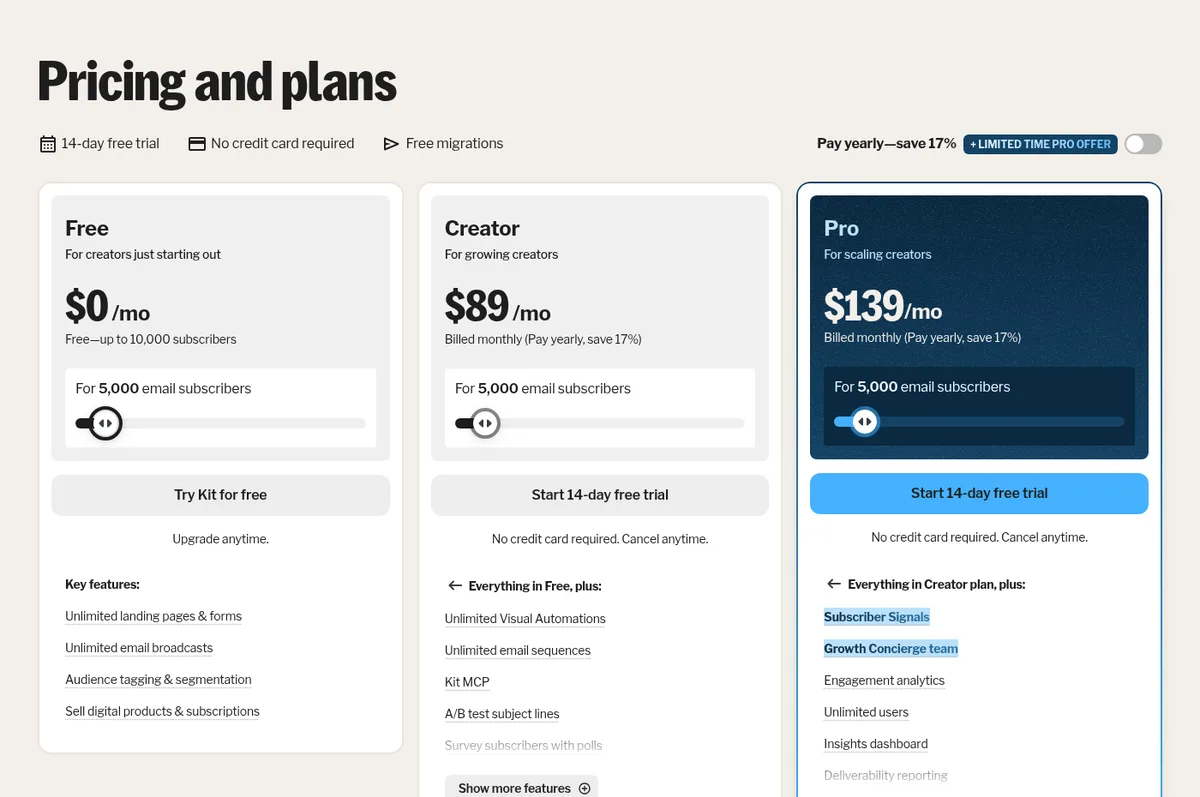
Both platforms price by subscriber count, but their tiers don’t line up exactly (Kit’s slider jumps from 1,000 to 3,000; beehiiv’s goes to 2,500). Here’s what each vendor’s pricing page showed on October 7, 2026.
Monthly billing
| Subscribers | Kit Creator | Kit Pro | beehiiv Lite | beehiiv Pro |
|---|---|---|---|---|
| 1,000 | $39 | $79 | $59 | $109 |
| 2,500 / 3,000* | $59 | $99 | $79 | $149 |
| 5,000 | $89 | $139 | $109 | $199 |
| 10,000 | $139 | $189 | $139 | $239 |
| 25,000 | $199 | $279 | $199 | $349 |
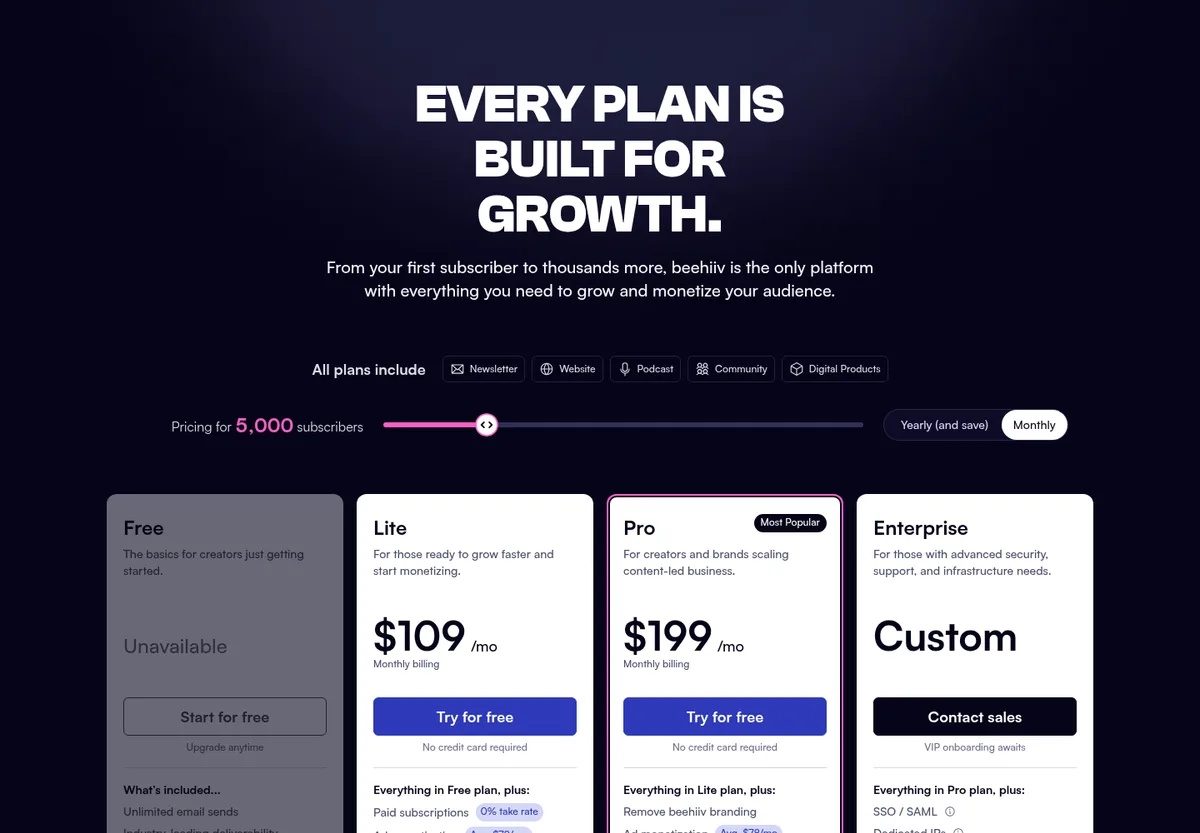
*Kit’s tier is 3,000 subscribers; beehiiv’s is 2,500. beehiiv’s Free plan is available up to 2,500 subscribers; its pricing page shows Free as “Unavailable” from 5,000.
Source: Kit pricing and beehiiv pricing, checked October 7, 2026.
Annual billing (effective monthly price)
| Subscribers | Kit Creator | Kit Pro† | beehiiv Lite | beehiiv Pro |
|---|---|---|---|---|
| 1,000 | $33 | $66 | $49 | $95 |
| 2,500 / 3,000* | $50 | $83 | $69 | $129 |
| 5,000 | $75 | $116 | $95 | $169 |
| 10,000 | $116 | $158 | $119 | $199 |
| 25,000 | $166 | $233 | $169 | $299 |
†Kit Pro figures are Kit’s standard annual rates. As of October 7, 2026, Kit is also advertising a limited-time discount on the first year of annual Pro (offer ends November 7, 2026); see our Kit pricing guide for the details.
Source: Kit pricing and beehiiv pricing, checked October 7, 2026.
What the numbers say:
- From 1,000 to 5,000 subscribers, Kit Creator is cheaper than beehiiv Lite ($39 vs $59 per month at 1,000 on monthly billing; $89 vs $109 at 5,000), and Kit’s free plan covers you up to 10,000 if you don’t need automations.
- At 10,000 and 25,000 subscribers, the two cost the same on monthly billing ($139 and $199). Billed yearly, Kit Creator is $3/month cheaper at both sizes.
- Kit Pro costs less than beehiiv Pro at every tier in these tables.
- On much bigger lists, beehiiv Lite is cheaper. beehiiv’s slider shows Lite at $299/month at 50,000 subscribers and $469/month at 100,000 (monthly billing). Kit’s slider shows Creator at $319 at 45,000, $379 at 55,000, and $619 at 95,000. Note that Lite tops out at 100,000 subscribers; beyond that, beehiiv’s options are Pro (up to 250,000) or Enterprise.
- The fair comparison depends on the features you need. If automations matter, compare Kit Creator with beehiiv Lite, keeping in mind that Lite allows up to 10 live custom automations (Pro is unlimited). If you need to remove branding, compare Kit Creator with beehiiv Pro, because beehiiv only removes its branding on Pro and Enterprise.
Kit’s FAQ says it upgrades you automatically when you pass your tier’s limit, and that downgrading after a list cleanup currently requires emailing its support team. beehiiv’s FAQ says you can upgrade to the next plan at any time and points you to Enterprise if you need custom subscriber limits.
Free plans: Kit Free vs beehiiv Free
This is the biggest practical difference for new writers.
Kit Free covers up to 10,000 subscribers and includes unlimited landing pages and forms, unlimited email broadcasts, tagging and segmentation, and selling digital products and subscriptions. What’s missing: email sequences, visual automations, RSS campaigns, removal of Kit branding, and more than one user. In practice, you can grow and send a weekly newsletter for free for a long time, but you can’t set up an automated welcome series until you upgrade to Creator.
beehiiv Free covers up to 2,500 subscribers and includes unlimited sends, the website builder and website templates (1 custom page), a podcast (1 show), community features, campaign analytics, a welcome email, subscribe forms, link-in-bio, the recommendation network, and API access (the Send API is Pro and up). What’s missing: custom domains, custom automations, paid subscriptions, the Ad Network, the referral program, A/B testing, and surveys, which all start on Lite.
Bottom line: Kit’s free plan lasts much longer and lets you charge money; beehiiv’s free plan includes a website and podcast tools, but you’ll need Lite for a custom domain or to charge subscribers.
Source: Kit pricing and beehiiv pricing (plan cards and feature comparison table), checked October 7, 2026.
Writing and publishing
beehiiv is built around posts. Every newsletter issue can also be a web page on your beehiiv website. The website builder and templates are on every plan; Lite and up add the advanced website builder, custom domains, more custom pages (5 on Lite, unlimited on Pro), and full website analytics. If you want your newsletter archive to double as a blog that ranks in search, that’s beehiiv’s natural model.
Kit is built around subscribers and emails. You send broadcasts (one-off emails) and sequences (automated series), and you can publish a newsletter feed and website plus unlimited landing pages. Kit’s pricing page highlights its email designer, template library, custom HTML/CSS templates, and Liquid-based conditional content for personalization.
Both let you connect a custom domain (on beehiiv, from Lite). Both include a recommendation network for cross-promotion with other newsletters.
Automation
If you want subscribers to get a welcome series, a free course, or different emails based on what they click, automation is the deciding factor.
- Kit Creator includes unlimited visual automations and unlimited email sequences, a visual automation template library, and 100+ app integrations. Tags and segments are central to how Kit works: subscribers live in one list and are organized by tags.
- beehiiv includes a welcome email on every plan, including Free. Lite adds custom automations (up to 10 live at once) with triggers such as sign-ups, form submissions, tags, segments, and paid-subscription events. Pro makes live automations unlimited and adds click-triggered automations, A/B split and advanced conditions, and dynamic content.
For a solo writer who mainly sends one newsletter a week, beehiiv Lite’s automations are likely enough for a welcome series. If you’re building funnels (lead magnet, then nurture sequence, then product pitch), Kit’s model is designed for exactly that.
Source: Kit pricing and beehiiv pricing, checked October 7, 2026.
Growing your list
- Recommendations: Both have free recommendation networks. Kit’s “Free Recommendations” promote your newsletter across its network of Kit creators; beehiiv includes its recommendation network on every plan. Both also run paid recommendations (you earn money for recommending other newsletters): Kit on Creator and up, with a 23.5% fee on those earnings; beehiiv on Lite and up.
- Referral programs: beehiiv has a built-in referral program on Lite and up (Lite allows 3 referral milestones; Pro is unlimited). Kit’s referral system is a Pro-plan feature, delivered as a free SparkLoop plan (Kit values it at $99/month).
- A/B testing: Kit’s plan card lists subject-line A/B tests under Creator, and its comparison table shows two-subject-line tests on every plan, including Free; Pro expands this to up to five subject lines and content tests. beehiiv includes A/B testing on Lite and up.
Source: Kit pricing and beehiiv pricing, checked October 7, 2026.
Making money
This is where the two platforms differ most in philosophy.
Paid subscriptions
- Kit lets you run a paid newsletter and sell subscriptions and digital products on every plan, including Free. Its transaction fee is 3.5% + 30¢, and Kit says that figure includes credit card processing (Kit describes its own portion as 0.6%).
- beehiiv requires Lite or higher for paid subscriptions, takes 0% of your subscription and digital product revenue, and you pay Stripe’s processing fees (beehiiv’s FAQ cites 2.9% + $0.30 per transaction). Check your Stripe account for any additional Stripe fees that apply to recurring billing in your country.
Example: on a $8/month subscription, Kit’s fee works out to about $0.58 per payment (3.5% + 30¢, processing included). On beehiiv, Stripe’s standard card fee is about $0.53, but you’re also paying for Lite: $59/month on monthly billing at 1,000 subscribers, or $49/month billed yearly. For a solo writer just starting to charge, Kit’s model means you can test a paid tier without upgrading. Because the per-payment gap is small, the choice between them usually comes down to features and plan price rather than transaction fees.
Source: Kit pricing and beehiiv pricing, checked October 7, 2026.
Ads and sponsorships
- beehiiv Ad Network (Lite and up) matches newsletters with advertisers; Pro adds a “Sponsorship storefront.”
- Kit Newsletter sponsorships (Creator and up) match you with brands; Kit says you approve every ad.
We haven’t run either ad product yet, so we can’t compare fill rates or payouts. We’ll update this section once we have real data.
Support and migration
- Kit offers 24/7 email and chat support on paid plans (priority support on Pro), and a free migration service on paid plans: its in-house team rebuilds forms, templates, and automations. Kit also offers a 30-day refund window on monthly or annual plans.
- beehiiv’s feature table lists support through its “beehiiv Agent” on Free, standard support on Lite, priority support on Pro, and a customer success manager on Enterprise. beehiiv publishes detailed self-serve migration guides, including for Kit and Mailchimp. For hands-on help, it points to its directory of paid beehiiv Experts.
If you’re switching, see our guides: How to migrate from Kit to beehiiv, How to migrate from Mailchimp to Kit, and How to migrate from Substack to beehiiv.
Source: Kit pricing (comparison table and FAQ), beehiiv pricing, and beehiiv’s Kit migration guide, checked October 7, 2026.
Which should you pick?
| Your situation | Better fit (based on documented features and pricing) |
|---|---|
| Starting out, not charging, want to grow for free as long as possible | Kit Free (10,000-subscriber limit) |
| Want a newsletter website/archive that works like a blog | beehiiv |
| Want to launch a paid tier without upgrading | Kit (paid subscriptions on Free) |
| Paid newsletter already earning meaningful monthly revenue | beehiiv Lite (0% platform take rate; you pay Stripe’s fees) |
| Selling courses or digital products with email funnels | Kit Creator |
| Want to earn from ads without selling sponsorships yourself | beehiiv Lite (Ad Network), or Kit Creator (Newsletter sponsorships) |
| 10,000 to 25,000 subscribers and cost-sensitive | Either: Kit Creator and beehiiv Lite cost the same on monthly billing; Kit is slightly cheaper billed yearly |
| 50,000+ subscribers and cost-sensitive | beehiiv Lite is cheaper on the tiers both pages show (Lite caps at 100,000) |
| Need to remove platform branding cheaply | Kit Creator (beehiiv requires Pro) |
What we’ll add after hands-on testing
Once we’ve set up accounts on both platforms, we’ll update this comparison with:
- Screenshots of both editors, automation builders, and analytics from those accounts
- How long it takes to set up a basic welcome email on each
- Notes on editor quirks and deliverability settings
Sources
All checked October 7, 2026.
- Kit: Pricing and plans, including the subscriber slider (monthly and yearly), plan cards, comparison table, limited-time Pro offer details, and FAQ
- beehiiv: Pricing, including the subscriber slider (monthly and yearly), plan cards (Free, Lite, Pro, Enterprise), feature comparison table, and FAQ
- beehiiv: How to migrate from Kit to beehiiv (beehiiv Experts Directory)
The original September 27, 2026 version of this article used beehiiv’s previous plan names and prices (Launch, Scale, and Max). beehiiv’s pricing page showed the new Free, Lite, and Pro plans when we re-checked on October 1, 2026, and this update reflects them.